
Unlimited Data.
Infinite Possibilities.
Looking for B2B data? Download Unlimited data using our Chrome extension at just $79/month.
ZoomInfo Chrome Extension: Key Features, Benefits & Limitations for Sales Teams
Written by:
Junaid Hussain Khan
.

ZoomInfo Chrome Extension: Features, Uses & Limits for Sales

>How B2B Data Solutions

How to Evaluate B2B Data Vendors for Accuracy and Compliance

Sales today move fast, and every extra click slows reps down. The ZoomInfo Chrome Extension is designed to remove friction by bringing contact and company data directly into your prospecting workflow—right were selling actually happens.

With the extension, reps can view verified emails, phone numbers, and company insights on LinkedIn and company websites. No tab switching. No copy-pasting. Just the information needed to act, exactly when it matters.

In this guide, you’ll learn how the ZoomInfo Chrome Extension works, where it delivers the most value, its limitations, and how it compares with ReachStream—so you can choose the right tool for your sales workflow.

What Is The Zoominfo Chrome Extension?

The ZoomInfo Chrome extension is a browser-based sales tool that integrates ZoomInfo’s B2B database into your workflow. Instead of logging into a separate platform, you can access contact and company insights while browsing LinkedIn or researching online.

It’s designed for sales reps, marketers, and recruiters who want to work faster without losing data quality.

Overview And Core Functionality

At its core, the ZoomInfo extension for Chrome helps users:
As a result, prospecting feels less like research and more like action.

Supported Platforms And Integrations

The ZoomInfo Google Chrome extension works smoothly across:

It also integrates with popular CRMs and sales engagement tools, making follow-ups easier and more consistent.

Features Of Zoominfo Chrome Extension

Sales insights, right inside your browser; built for fast, focused prospecting.

Instant contact discovery

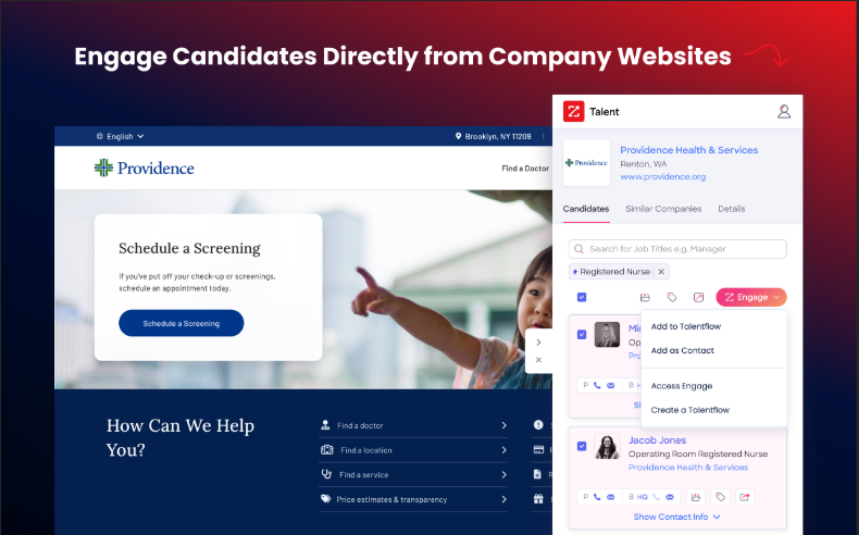
Find verified work emails and direct phone numbers as you browse LinkedIn profiles or company websites.

Company insights at a glance

Explore key details like company size, industry, revenue, and location right away—no extra digging needed.

Org charts and decision-maker visibility

Quickly understand who’s who and connect with the right decision-makers faster.

CRM syncing in a few clicks

Save contacts straight to your CRM and skip the spreadsheets and manual updates.

Works seamlessly across prospecting channels

Access accurate, up-to-date contact and company information while prospecting on LinkedIn, Sales Navigator, or corporate websites.

Outcome-focused close:

Together, these features help turn everyday browsing into focused outreach and real conversations.
ZoomInfo Chrome extension

How the ZoomInfo Chrome Extension Works

Once installed, the extension runs quietly in the background. When you open a LinkedIn profile or browse a company website, it automatically pulls in available contact and company details in a side panel, right where you’re working.

That means less busy work and a smoother prospecting experience.

Key Use Cases for the ZoomInfo Chrome Extension

Prospecting on LinkedIn

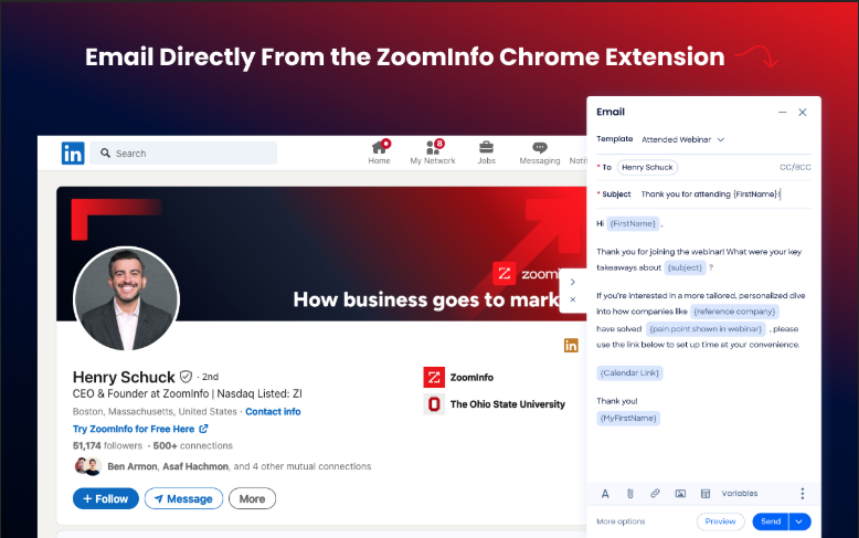
When reps browse LinkedIn profiles, contact details appear instantly. There’s no need to save profiles or come back later—reps can act while interest is fresh.

Sales Lead Generation and List Building

Sales and marketing teams use the extension to build targeted lead lists as they research accounts, cutting down time spent on manual data gathering.

Recruiting and Candidate Research

Recruiters use the extension to find potential candidates, confirm roles, and access contact details faster, helping shorten hiring cycles.

Workflow Automation and Outreach Optimization

When connected with your CRM and outreach tools, lead capture and follow-ups happen automatically. This keeps pipelines moving and reduces the time spent on repetitive admin tasks.

Installing the ZoomInfo Chrome Extension

Getting started is straightforward:
  1. Add the extension from the Chrome Web Store
  2. Sign in with your credentials
  3. Allow browser permissions
  4. Connect CRM and outreach tools
Once installed, the extension fits naturally into your day-to-day prospecting—no extra steps, no learning curve.
ZoomInfo Chrome extension sending email from LinkedIn profile interface

ZoomInfo vs ReachStream: Chrome Extension Comparison

Both ZoomInfo and ReachStream are great tools that help teams find prospects more quickly, but each is designed to meet different needs.

Data Quality and Coverage

ZoomInfo emphasizes depth with org charts, intent data, and detailed company insights. ReachStream prioritizes speed and accessibility, providing fast, verified contact details at a lower cost.

Ease of Use and Onboarding

ReachStream is easier for smaller teams to get started with. ZoomInfo requires more setup but offers more detailed insights for complex sales strategies.

Pricing and Credit Models

ZoomInfo’s pricing isn’t listed publicly. Plans are tailored and mainly credit-based, so costs go up as usage increases.
Category / Plan Target Team Pricing Visibility Key Notes
Sales
Sales teams
Custom quote
Credits consumed for data exports
Marketing
Marketing teams
Custom quote
Includes data + marketing tools
Talent
Recruiting teams
Custom quote
Focused on candidate data
Professional
Individual reps
Free trial available
Core contact & company data
Copilot Advanced
SMB / Mid-market
Free trial available
AI insights, buyer intent
Copilot Enterprise
Enterprise
Free trial available
Advanced AI, intent, analytics
ReachStream offers clear, upfront pricing with predictable limits, no surprise overages.
Plan Name Price (Monthly, Billed Annually) Best For
Icebreaker
$0, with 200 email views, and 100 export credits each month.
Getting started
Glacier
$29, unlimited email views, and 5,000 export credits each month.
SMB sales teams
Ice Floe
$49, with unlimited email views, and 10,000 export credits each month.
Growing teams
Polar Peak
$79, with unlimited email views, and 20,000 export credits each month.
High-volume teams
Frozen Fortune
Custom pricing, tailored users & export credits
Large teams with custom needs

What’s consistent across ReachStream plans:

If speed, simplicity, and predictable pricing matter to your sales team, ReachStream is built for how modern reps prospect today

Best Use Cases for Each Tool

Hidden Costs Or Drawbacks Of Zoominfo

From other sites, ZoomInfo pricing is customized, but it’s still an expensive tool.
Plans Professional Plan Advanced Plan Enterprise / Full Access
Starting Price (per year)
$15,000–$18,000
$22,000–$28,000
$35,000–$45,000+
Team Management
1–3 users typically
Mid-size teams
Large teams / org-wide access
Inclusions
  • Core B2B contact & company data
  • Limited user licenses
  • Basic integrations
  • Expanded data access & advanced features
  • More user seats & enhanced functionality
  • Advanced integrations & intent data
  • Full platform access across modules
  • Enterprise-level user capacity
  • Premium integrations, intent & GTM tools
Additionally, ZoomInfo operates on a credit-based model, so heavy prospecting can quickly use up credits and increase costs beyond expectations. It’s best suited for enterprise teams with large budgets; smaller or fast-moving teams might find it limiting over time.
What Users Say About the ZoomInfo Chrome Extension

User reviews highlight frequent reliability issues. While the data can be useful, many reps report login problems, freezing, and slow load times during daily prospecting.

As one user puts it: “To summarize what everyone else is saying — it doesn’t work.”

Another adds: “Constantly freezes and needs to be reloaded.”
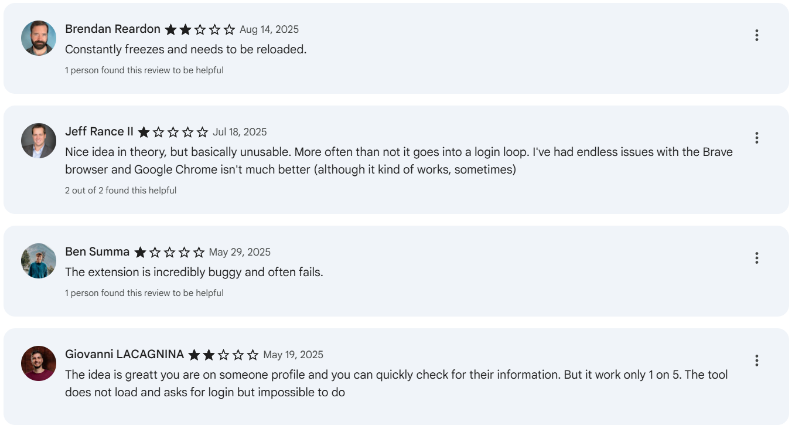
Zoominfo Chrome extension reviews
Bottom line: The idea is solid, but technical issues make the extension frustrating for teams that rely on it every day.

So, what does this mean for your team?

ZoomInfo offers deep data, but it often comes with extra setup, credit limits, and slower workflows. If your reps live on LinkedIn, the choice is simple: more friction—or faster prospecting.

So, what does faster, lower-friction prospecting actually look like in practice?

Let’s take a closer look at ReachStream’s Chrome Extension—and how it’s built differently from ZoomInfo to help reps move faster on LinkedIn.

What the ReachStream Chrome Extension is and how it works

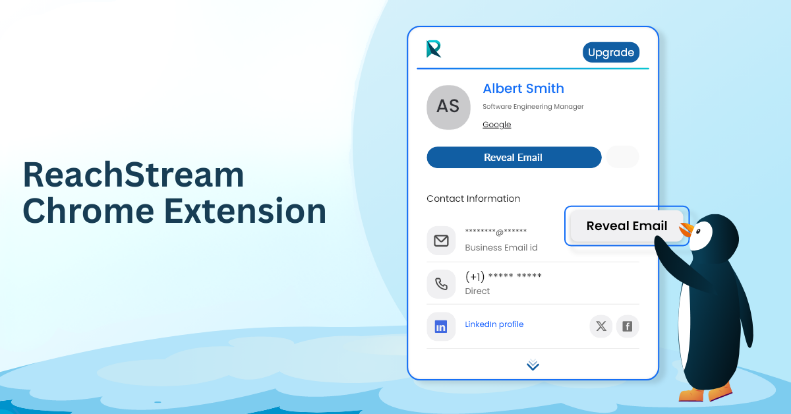
Our Chrome Extension integrates into your LinkedIn prospecting, appearing where needed to help you save contacts, view details, and reach out effortlessly.

It runs quietly in the background, letting you focus on building connections seamlessly.

Optimizing LinkedIn Prospecting with ReachStream

LinkedIn prospecting works best when it’s fast and focused—and that’s where ReachStream helps.

We make account-based prospecting more accurate and much less time-consuming.
Maintaining Data Accuracy and Hygiene

Great outreach starts with data you can trust. Without it, even the best message never reaches the inbox.
Keeping clean, verified data helps your team focus on outreach that effectively reaches and converts real buyers.

Installing the ReachStream Chrome Extension

Getting started is quick and simple:
ReachStream's LinkedIn Chrome Extension
Want to see how ReachStream fits into your daily LinkedIn prospecting? Get unlimited contact views, verified emails, and fast exports, right where you prospect.

Making The Right Choice Based On Your Workflow

The right Chrome extension depends on how your team sells. ZoomInfo is a strong fit for teams that need deep data and detailed insights across longer sales cycles. ReachStream is built for speed, simplicity, and predictable costs—ideal for teams that live in LinkedIn and want to move fast.

Both tools help improve prospecting. The best choice comes down to your workflow, budget, and how quickly you want to turn leads into conversations.

Frequently asked questions

1. What is the purpose of the ZoomInfo Chrome Extension?

It enables sales, marketing, and recruiting teams to access contact and company information directly while browsing LinkedIn, company websites, or Google search results. It displays business emails, phone numbers, company details, and organizational insights without switching tools, helping teams prospect more efficiently.
ZoomInfo provides a limited free trial, but most features—including exporting contacts—require a paid plan. The ZoomInfo Chrome extension uses a credit-based system, meaning costs grow as teams export more data.

While the ZoomInfo Chrome extension emphasizes in-depth enterprise insights, ReachStream’s Chrome Extension is designed for speed and simplicity. Our platform provides:

  • Unlimited contacts and company views
  • Transparent, straightforward pricing
  • Quick LinkedIn prospecting with minimal setup

This makes us an ideal choice for SDRs and sales teams conducting high-volume LinkedIn outreach.

Yes. Our Chrome Extension for LinkedIn works seamlessly on both LinkedIn and LinkedIn Sales Navigator. Sales reps can reveal verified emails and phone numbers, save leads, and build lists directly from search results or profiles.
For small and mid-sized teams, ReachStream’s Chrome Extension is usually a better choice. It’s easier to set up, more affordable, and helps avoid unpredictable credit usage. ZoomInfo is more suitable for enterprise teams that require advanced intent data, org charts, and complex ABM workflows.
Junaid Hussain Khan

Author

Junaid Hussain Khan
Sales & Lead Generation Expert skilled in B2B Marketing, Prospecting, and Demand Generation with a Business Administration degree from Al-Ameen Institute of Management Studies.
Share
Table of Contents

Access 200M+ verified business emails and grow your sales pipeline effortlessly.

Power Your Sales with Targeted Data
Junaid Hussain Khan
Junaid Hussain KhanAuthor
Junaid Hussain Khan is the Business Development Manager at ReachStream, adept at forging strategic partnerships and identifying new market opportunities to propel ReachStream's growth and strengthen its position in the B2B ecosystem.

Don't forget to share this post!

Check out our other blogs!