How to Evaluate B2B Data Vendors for Accuracy and Compliance
Written by:

Mohammed Younus
Email Verification Best Practices for Sales Teams
>Email Verification

TL;DR
- Email verification best practices start with running every new contact through a reliable email verifier before it ever reaches a sending platform.
- A high bounce rate from unverified lists can quietly damage your sender reputation and hurt inbox placement for weeks after the fact.
- Verifying contacts in real time at the point of capture prevents most email list decay before it ever starts.
- Sales and marketing teams get the best results when verification is built into the daily workflow, not treated as an occasional cleanup project.
- Not every failed result means the same thing. Understanding email status categories such as risky, invalid, and do not mail changes how you should treat each contact.
- Multiple verification methods, including syntax checks, domain checks, and mailbox level pings, each catch different problems, so relying on just one leaves gaps.
- Re-verifying lists before every campaign, not only at the point of import, is one of the most overlooked email verification best practices.
Introduction
Every sales or marketing team eventually learns the same lesson the hard way. A prospect list that looked fine in a spreadsheet turns into a wave of bounces the moment a campaign goes out. Open rates drop, a few emails land in spam instead of the inbox, and a perfectly good outreach sequence starts fighting an uphill battle. This is usually not a copywriting problem. It is an email verification problem.
Email verification best practices exist for exactly this reason. They give sales professionals, SDRs, marketers, RevOps teams, founders, recruiters, and agencies a repeatable way to check that an address is real, active, and safe to send to before it touches a campaign. Done well, verification quietly protects deliverability in the background so the rest of the go to market motion can work as intended.
This guide covers how email verification actually works, how to build a workflow that scales with your pipeline instead of slowing it down, and the mistakes even experienced teams still make. You’ll also find practical checklists and recommendations for handling real-world verification scenarios.
Tired of Guessing Which Contacts Are Safe to Send To?
See how ReachStream Email Verifier fits into your existing workflow before your next send.
Why Email Verification Best Practices Matter More Than Ever
Inbox providers have gotten sharper. Gmail and Yahoo now enforce stricter sending requirements, and spam filters increasingly weigh sender behavior, not just message content. Sending to a list full of dead addresses is one of the fastest ways to trip those filters, even with strong subject lines and copy.
An email marketer who ignores verification is essentially flying blind. Every inactive email address on a list is a small tax on deliverability, and enough of them turns that tax into a penalty that follows the domain into future email campaigns, long after the original list is cleaned up.
INDUSTRY INSIGHT
Mailbox providers generally treat a bounce rate above 2 percent as a warning sign, and rates above 5 percent are widely considered high enough to trigger deliverability problems. These are not official published rules, but they reflect the general consensus among deliverability practitioners.
The practical upshot is simple. Verification is not reserved for enterprise teams with dedicated deliverability specialists. It is baseline hygiene for anyone sending cold outreach, newsletters, or transactional email at scale.
How Email Verification Actually Works
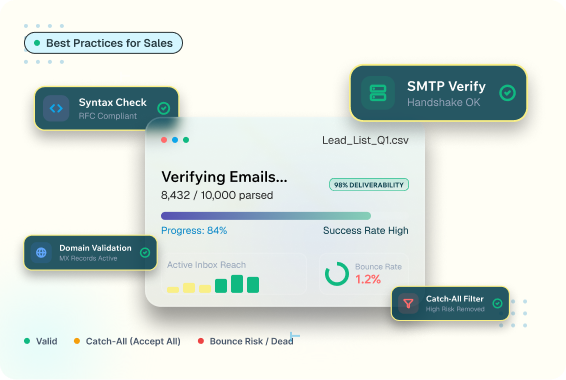
Most people think of address verification as a single yes or no test. In practice, a proper verification system runs several checks in sequence, and each one catches a different category of problem.
Syntax and Format Checks
This is the first and simplest layer. The tool confirms the address is structured correctly, with a valid local part, an @ symbol, and a properly formatted domain. It catches obvious typos, like a missing dot in a domain name, but it says nothing about whether the mailbox actually exists.
Domain and MX Record Checks
Next, the system checks whether the domain is registered and configured to receive mail by looking up its MX records. An address on a domain with no mail server configured is dead on arrival.
Mailbox-Level Verification
This is where real time email verification earns its keep. The system performs a controlled handshake with the receiving mail server to check whether the specific mailbox exists, without actually sending a message, separating genuinely useful verification from surface–level formatting checks.
Understanding Email Status Categories
A good email verification service does not just return valid or invalid. It typically returns a more nuanced email status, because not every result should be treated the same way:
- Valid: the mailbox exists and is safe to send to.
- Invalid: the address does not exist, or the domain cannot receive mail.
- Risky: the address shows signs of trouble, such as being tied to a role-based inbox or a domain with a history of complaints.
- Unknown: the verification check could not reach a confident result, often due to a temporary server issue.
- Do Not Mail: the address is flagged for compliance or reputation reasons and should be suppressed regardless of technical validity.
TIP
Do not treat “invalid” and “risky” results as automatic rejects. Segment them into a separate, lower volume sending track instead of discarding them outright. Some of those contacts are perfectly reachable, they simply could not be confirmed with full certainty.
Building an Email Verification Workflow That Scales
A one-time list cleanup solves today’s problem. An email verification workflow solves the recurring one, because email list decay is constant. Deliverability professionals commonly estimate that B2B contact databases degrade by roughly 20 –30% per year as people change jobs and domains get retired.
Real-Time Verification at the Point of Capture
The cheapest place to catch a bad address is the moment it enters your system, whether through a signup form, a manually entered lead, or an event list import. Verifying emails at capture keeps bad data out of your CRM in the first place.
Batch Verification Before Every Campaign
Even a list that was clean six months ago has decayed by now. Running it through batch verification before each significant send is one of the simplest verification best practices, and one of the most frequently skipped.
COMMON MISTAKE
Verifying a list once at import and never again is one of the most common mistakes in B2B sending. A list verified in January can easily be out of date by the following quarter. Treat verification as a recurring task tied to your campaign calendar, not a one-time gate.
Ongoing List Hygiene
Between full re-verification passes, watch engagement signals. Addresses that never open or click after repeated sends are worth re-checking or suppressing, even if they technically passed the verification. Email engagement and email deliverability are closely linked, and a valid address that never engages still drags down sender reputation over time.
Bring ReachStream Email Verification into Your Everyday Workflow
Run a free check on your next list before it goes anywhere near a campaign.
Email Verification Best Practices Checklist
Use this as a working checklist for email list verification rather than a one-time reference. Most teams find it useful to revisit before every major campaign.
- Verify every new contact at the point of capture, not after it has entered your CRM.
- Re-run batch verification on any list older than 60 to 90 days before sending.
- Segment “risky” and “invalid” results into a separate, lower volume track.
- Suppress anything flagged do not mail regardless of technical validity.
- Track bounce rate after every send and investigate anything above 2 percent.
- Document how verification fits into your process so it survives team turnover.
- Choose a verification provider with clear status categories, not just valid or invalid.
Common Mistakes Sales and Marketing Teams Make
Ignoring role-based and generic addresses
Inboxes like info@ or sales@ often pass technical verification but rarely convert and are more likely to sit in shared inboxes with higher complaint rates.
Relying on a single verification method
Syntax checks alone catch typos but miss dead mailboxes entirely, so teams that rely only on format validation are still sending emails to invalid addresses without realizing it.
BEST PRACTICE
Build verification into the tools your team already uses daily, such as your CRM or outreach platform, instead of a separate manual step. Extra manual exports get skipped under deadline pressure, and skipped verification is effectively no verification at all.
How Verification Protects Your Sender Reputation
Sender reputation is the invisible score that inbox providers assign to a sending domain based on past behavior. A high bounce rate, frequent spam complaints, and low engagement all pull that score down, and a lower score means future emails, even to genuinely valid addresses, are more likely to land in spam.
EXPERT INSIGHT
Experienced deliverability teams treat verification as reputation insurance, not just a data quality task. The real cost of skipping it rarely shows up on the campaign where the bad list was used. It shows up two or three campaigns later, when damaged reputation quietly suppresses open rates on lists that were perfectly clean.
This is why verification belongs earlier in the funnel than most teams place it. Waiting until a campaign underperforms to investigate list quality usually means the damage is already done.
Choosing Between Email Verification Tools and Platforms
Not all email verification platforms are built the same way, and the differences matter more once you are verifying at scale.
| Consideration | What to Look For | Why It Matters |
|---|---|---|
|
Accuracy |
A published, verifiable accuracy figure, not a vague claim |
Affects how many valid contacts get wrongly discarded |
|
Status granularity |
Multiple result categories, not just valid or invalid |
Lets you make judgment calls on risky and invalid addresses |
|
Batch limits |
Upload limits that match your list sizes |
Avoids splitting large lists into multiple manual uploads |
|
Compliance posture |
Recognized certifications and data handling standards |
Matters more each year as privacy regulation expands across regions |
PRO TIP
When comparing vendors, ask how each one classifies domains specifically. This is one of the areas where email verification methods vary the most from provider to provider, and it has a direct impact on how many contacts you end up treating as unusable versus simply uncertain.
See Your List's Real Status Before You Send
Check email addresses for valid, invalid, risky, and unknown statuses with ReachStream Email Verifier. Sign up and get 100 free credits to start.
Conclusion
Email verification best practices are not a one-time project you finish and move past. They are an ongoing discipline, built into how contacts enter your systems and how lists get treated before every send. Teams that treat verification as a recurring workflow consistently protect their sender reputation and get more messages into the inbox where they belong.
The core habits are straightforward. Verify at the point of capture. Re-check before every meaningful campaign. Treat risky and catch-all results with judgment instead of blanket rejection. And choose an email verification service that gives you enough detail to make those calls with confidence.
Put These Best Practices into Action Today
Verify your next list with ReachStream Email Verifier and see valid, invalid, risky, unknown, and do-not-mail results in one report.
Frequently Asked Questions
What are email verification best practices in simple terms?
They are the habits that keep an email list accurate before it is used for outreach: verifying new contacts at capture, re-checking lists before major campaigns, and treating uncertain results like risky invalid addresses differently from confirmed valid ones.
How often should I verify my email list?
Re-verify any list older than 60 to 90 days before a new campaign, since email list decay happens continuously as people change jobs and companies retire old domains.
Can email verification completely eliminate bounces?
No tool can guarantee zero bounces, since mailboxes can go inactive after verification and before a send. What it does is meaningfully reduce bounce rate by catching addresses that are already invalid or clearly risky at the time of the check.
How does email verification affect deliverability long term?
Consistently low bounce and complaint rates build sender reputation over time, which improves inbox placement across future email campaigns, not just the one where the clean list was used.
What Makes a Email Verification Tool worth Purchasing?
Focus on verified accuracy figures, the number of status categories returned, batch upload limits that match your list sizes, and recognized compliance certifications, rather than choosing based on price alone.
Mohammed Younus
Author
Mohammed Younus

Senior Manager of Business Operations specializing in B2B Marketing, Business Development, and Process Optimization, driving operational efficiency and growth at ReachStream.
Share
Table of Contents
Access 500M+ verified business emails and grow your sales pipeline effortlessly.
Power Your Sales
with Targeted Data
Mohammed Younus is the Senior Manager of Business Operations with a keen insight into the B2B landscape. Through his contributions to this blog, he aims to share cutting-edge tactics and insights that empower sales and marketing professionals to achieve unparalleled success.
Don't forget to share this post!















Check out our other blogs!

ReachStream’s Direct Dial Database: What Makes It Different
November 4, 2026
The B2B Outbound Playbook: From ICP to First Meeting
November 4, 2026

What Is Prospecting? A Beginner’s Guide for Sales Teams
November 3, 2026