Written by:

Mohammed Younus
Firmographic Data for Demand Generation: How Teams Use It
How to Evaluate B2B Data Vendors for Accuracy and Compliance

TL;DR
- Firmographic data describes companies by industry, size, revenue, employee count, location, ownership and growth.
- Demand generation teams use it to define an ideal customer profile, build account lists and segment audiences.
- Firmographics choose the accounts, while demographics such as job title choose the people inside them.
- The most useful filters are industry, company size, revenue and location, combined two or three at a time.
- LinkedIn advertising supports company-level targeting, so firmographic lists improve audience targeting.
- Use firmographics as the gate and intent data as the priority to decide who to contact first.
- Refresh records often, because company size and revenue change quickly.
What Is Firmographic Data for Demand Generation?
Firmographic data for demand generation is information about the companies you want to reach, such as their industry, size, revenue, location and growth, used to decide which accounts to target and what to say to them. Demand generation teams use it to build audiences, score leads and aim campaigns at businesses that look like their best customers.
Most B2B marketers already use B2B firmographic data without calling it that. Every time you pick a target industry, set a minimum company size or limit a campaign to one region, you are working with firmographic data. The difference between a team that does this well and one that does not is consistency: the same attributes defined the same way across the CRM, the ad platforms and the content plan.
What Are Examples of Firmographic Attributes?
Firmographic data examples fall into a handful of familiar groups. Industry tells you what the company does, often through a standard code such as SIC or NAICS. Company size is usually measured by employee count, and annual revenue gives a second view of scale. Location covers headquarters, regional offices and the markets a business serves.
Less obvious attributes add depth. Ownership structure separates public companies, private companies, subsidiaries and venture-backed startups, and each buys differently. Growth rate, shown through headcount change or funding activity, signals whether a company is expanding and likely to invest. Some teams also track the number of locations, the year the company was founded and the technology it uses.
You do not need every attribute. Pick the five or six that separate your best customers from the rest, and define them clearly so marketing and sales read them the same way. Our guide to what firmographic data is covers the basics in more detail.
How Is Firmographic Data Different From Demographic Data?
Demographic data describes an individual: age, job title, seniority, education or location. Firmographic data describes the organisation that person works for: industry, size, revenue and structure. In consumer marketing you target the person. In B2B marketing you usually need both, because a buying decision involves a role and a company.
That is the practical answer to firmographics vs demographics. Use firmographics to decide which accounts are worth pursuing, then use role and seniority to decide who inside them to speak to. A marketing director at a 50 People agency and a marketing director at a 5,000 People bank share a job title but need very different messages.
Technographic data, which shows the software a company uses, is a third layer. Our comparison of firmographic vs technographic data explains where each fits.
How Does Firmographic Segmentation Improve Targeting?
Firmographic segmentation is a form of market segmentation that groups accounts by company traits instead of guesses. Rather than sending one campaign to everyone in a database, you split it into tiers that share a size, sector or region, and speak to each group’s actual circumstances. This is the foundation of account segmentation for demand generation. A mid-market software firm and a global manufacturer rarely have the same budget, buying process or timeline. Segmenting by firmographics lets you match message, offer and channel to each group, and it stops you spending the same effort on accounts that will never convert.
It also supports lead qualification. If a form fill comes from a company outside your ideal customer profile, marketing can route it to a lighter nurture track instead of sales. If it comes from a perfect-fit account, it moves up the queue. Our ICP worksheet template helps you decide which traits belong in that profile.
Which Firmographic Filters Are Most Useful for B2B Campaigns?
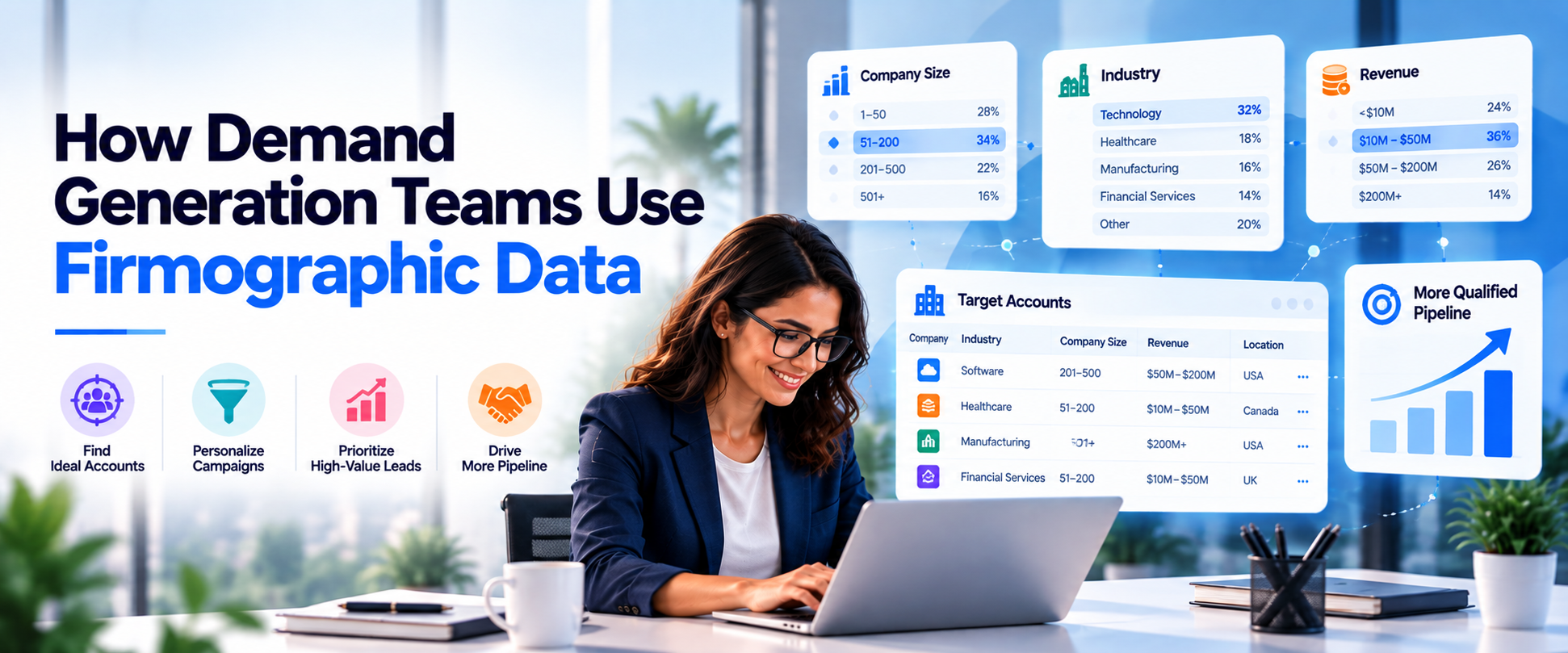
The most useful firmographic filters are the ones that predict who buys. B2B industry data, company size data and revenue and employee data are the three fields most teams filter on first. Start with industry, because pain points and language change by sector. Add company size, measured by employee count or annual revenue, since it often decides budget and the number of people involved in a purchase.
Then layer in location for territory planning, language and compliance. After those, growth rate and ownership structure sharpen the list. A fast-growing company is more likely to be hiring, buying tools and changing processes. A venture-backed startup may move faster than a long-established family business, though it may also have a smaller budget.
Firmographic targeting works best when filters are combined. ‘Software companies with 200 to 1,000 employees in North America’ is a workable audience. ‘Software companies’ is not. Test each filter against your closed-won deals to see which ones actually correlate with revenue before you build campaigns around them.
Can Firmographic Data Improve LinkedIn Ad Targeting?
Yes. LinkedIn advertising lets you aim campaigns at members who work at companies with certain traits, and that is firmographic targeting in practice. Campaign Manager offers company-level options such as industry and company size, and you can also upload a list of target accounts. Check the platform for the current set, because options and minimum audience sizes change.
The strongest approach is to start from your own data. Build a list of accounts that match your ideal customer profile, upload it as a matched audience, and layer on job function and seniority to reach the right roles. This gives you precise audience targeting without paying to reach companies you would never sell to.
Firmographics also improve personalized messaging. Ad copy written for finance leaders at mid-sized manufacturers will outperform generic copy aimed at ‘business leaders’, because the reader sees their own situation in it.
Build account lists from the firmographic filters you trust
Filter by industry, role, company size, revenue and location, then export verified contacts.
Which Firmographic Attributes Support Which Campaign Goal?
Different goals need different attributes. The table below shows how three groups of firmographic data are typically used in demand generation: industry and location, company size and revenue, and growth and ownership.
Treat it as a working guide. Most campaigns use two or three of these together, not one alone.
| Attribute group | What it tells you | Best campaign use | Typical source | Watch out for |
|---|---|---|---|---|
|
Industry and location |
What the company does and where it operates |
Sector messaging, territory planning and regional campaigns |
Company databases, industry codes and business directories |
Broad industry labels that hide very different businesses |
|
Company size, annual revenue and employee count |
Scale, budget and likely buying process |
Tiering accounts and choosing between ABM and broader programs |
Company databases and public filings |
Estimates for private companies that go stale quickly |
|
Growth rate and ownership structure |
Momentum, funding and how decisions get made |
Prioritising fast-moving accounts and tailoring the offer |
Headcount trends, funding news and company profiles |
Growth signals that fade fast if records are not refreshed |
How Do Demand Generation Teams Put Firmographic Data to Work?
- Define the ideal customer profile: Use your best customers to pick the industry, size, region and growth traits that matter most.
- Build a target account list: Apply those firmographic filters to a database to produce a list of matching companies.
- Segment into tiers: Split accounts by size or strategic value so each tier gets the right level of effort.
- Tailor the message: Write personalized messaging for each segment, using the language and problems of that particular sector.
- Activate across channels: Load the list into LinkedIn advertising, email and sales outreach so every channel targets the same accounts.
- Measure pipeline generation: Track which segments create meetings and opportunities, then refine the filters.
How Should Firmographic Data Be Combined With Intent Data?
Firmographic data tells you who fits. Intent data tells you who is active right now. Used together they cover both questions a demand generation team has to answer: which companies are worth pursuing, and which of them are ready for a conversation.
A simple way to combine them is to treat firmographics as the gate and intent as the priority. First filter to accounts that match your ideal customer profile. Then rank those accounts by buying signals such as research activity, content engagement or hiring. Fit without intent goes into slower nurture, while fit plus intent goes to sales quickly.
Intent signals on companies that do not fit your profile are often noise, so resist chasing them. If you want to go deeper, our guides on intent data for campaign targeting and contact data vs intent data explain how it works together.
What Mistakes Weaken Firmographic Targeting?
- Using too many filters: A very narrow audience can shrink below the size an ad platform needs and starve your pipeline.
- Relying on outdated records: A company that doubled or halved in size last year may now be in the wrong segment.
- Treating all fields equally: Some attributes predict revenue and some do not. Test against closed deals.
- Ignoring the buyer role: A perfect-fit company still needs the right person inside it.
- Keeping data in silos: If marketing and sales define segments differently, handoffs break down.
- Never reviewing the profile: Your ideal customer changes as your product and market do.
Where Does ReachStream Fit in Firmographic Targeting?
ReachStream Prospect helps B2B teams put firmographic targeting into practice. You can filter contacts and companies by industry, job title, company size, revenue, and location to identify accounts that match your ideal customer profile.
Build dynamic lists that update automatically, use Similar Companies to discover businesses resembling your best customers, and leverage Technology Insights to refine targeting based on the technologies companies use. The built-in email verifier checks email addresses, helping you make better use of your export credits by focusing on verified email data.
Once your target lists are ready, you can export contact data for use in your CRM or integrate it into existing systems through ReachAPI. ReachStream also provides guidance on CRM integrations, including HubSpot. For a practical example of how firmographic filters support account-based marketing, explore our guide on how marketing teams use ReachStream for ABM
Start with 100 free export credits a month
Find Your Ideal B2B Prospects and Generate More Leads.
Firmographic Data for Demand Generation: The Short Version
Firmographic data for demand generation comes down to a clear loop: define your ideal customer profile, filter for matching accounts, segment them, tailor the message and measure pipeline by segment. Add intent data to decide who to contact first, and keep records fresh so your segments stay accurate.
For your next read, see our guide to creating an ideal customer profile and our overview of B2B data.
Find a plan that fits your campaign volume
Compare ReachStream’s plans and Start Prospecting Today!
Frequently Asked Questions
1. What is firmographic data?
Firmographic data is information about a company, such as its industry, size, annual revenue, employee count, location, ownership structure and growth rate. B2B teams use it to decide which accounts fit their ideal customer profile and how to segment them. It is the company-level equivalent of demographic data for individuals.
2. How do demand generation teams use firmographic data?
Demand generation teams use firmographic data to define an ideal customer profile, build target account lists, segment audiences into tiers and aim campaigns by industry, size and region. They also use it for lead qualification, routing fit accounts to sales quickly. It guides ad targeting, content and personalized messaging.
3. What are examples of firmographic attributes?
Common firmographic attributes are industry, company size, annual revenue, employee count, location, ownership structure, growth rate and number of locations. Teams also track the year a company was founded and its funding stage. You rarely need all of them, so pick the handful that best separate your top customers from the rest.
4. How is firmographic data different from demographic data?
Demographic data describes individuals, including job title, seniority and age. Firmographic data describes the company they work for, including industry, size and revenue. B2B marketers need both: firmographics choose the accounts, and role or seniority choose the people to contact within them.
5. How does firmographic segmentation improve targeting?
Firmographic segmentation groups accounts by shared company traits, so each group gets a message and offer that fits its situation. It reduces wasted spend on poor-fit accounts and makes personalized messaging possible at scale. It also helps qualify leads, because fit can be checked before sales gets involved.
6. Which firmographic filters are most useful for B2B campaigns?
The most useful filters are usually industry, company size by employee count or annual revenue and location, followed by growth rate and ownership structure. Combine two or three of them to build a focused audience. Test which ones correlate with your closed-won deals before building campaigns around them.
7. Can firmographic data improve LinkedIn ad targeting?
Yes. LinkedIn advertising supports company-level targeting such as industry and company size, and it lets you upload a list of target accounts. Building that list from your ideal customer profile gives more precise audience targeting than broad filters alone. Platform options change, so check Campaign Manager for the current list.
8. How should firmographic data be combined with intent data?
Use firmographics as the gate and intent data as the priority. First filter to accounts that match your ideal customer profile, then rank those by buying signals such as research activity or content engagement. Accounts with both fit and intent should go to sales first, while fit without intent suits slower nurture.
Mohammed Younus
Author
Mohammed Younus

Mohammed Younus is the Senior Manager of Business Operations with a keen insight into the B2B landscape. Through his contributions to this blog, he aims to share cutting-edge tactics and insights that empower sales and marketing professionals to achieve unparalleled success.
Share
Table of Contents
Access 500M+ verified business emails and grow your sales pipeline effortlessly.
Power Your Sales
with Targeted Data
Mohammed Younus is the Senior Manager of Business Operations with a keen insight into the B2B landscape. Through his contributions to this blog, he aims to share cutting-edge tactics and insights that empower sales and marketing professionals to achieve unparalleled success.
Don't forget to share this post!















Check out our other blogs!
ReachStream’s Direct Dial Database: What Makes It Different
November 4, 2026
The B2B Outbound Playbook: From ICP to First Meeting
November 4, 2026
What Is Prospecting? A Beginner’s Guide for Sales Teams
November 3, 2026