Written by:

Abdul Kareem
ICP Refinement for SDRs: Target Better Prospects
- ReachStream > Sales
- > Article
- ReachStream > Sales
- > Article
How to Evaluate B2B Data Vendors for Accuracy and Compliance

TL;DR
- ICP refinement narrows a broad profile to the traits that predict replies, meetings and wins.
- Start from closed-won and closed-lost deals, and keep only the traits that separate them.
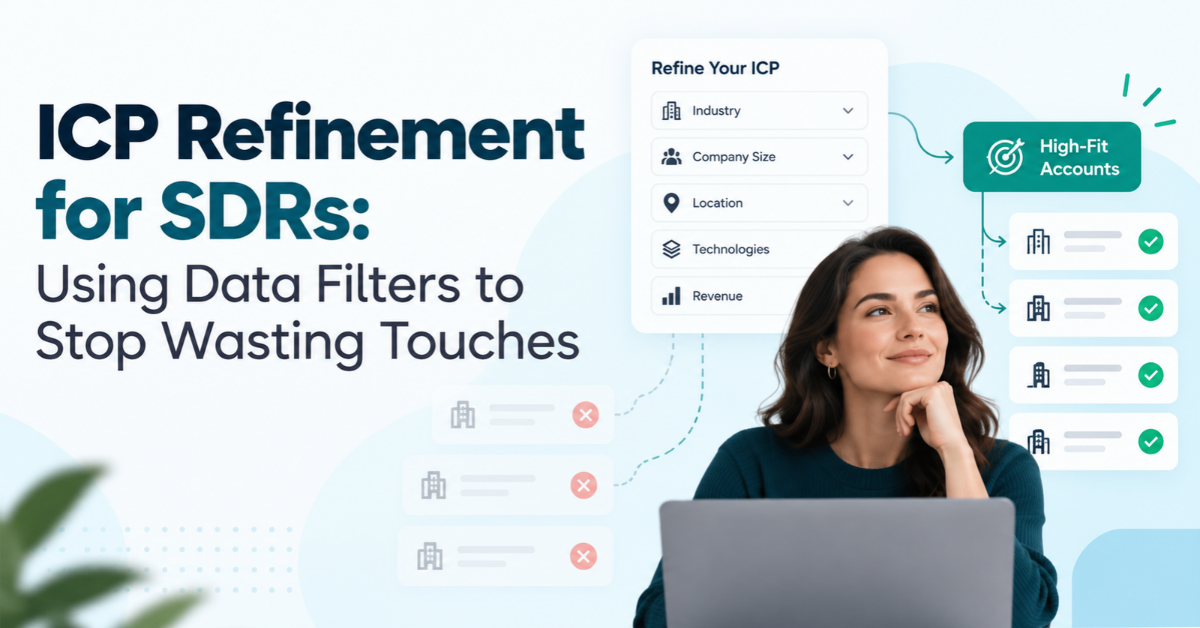
- Core SDR prospecting filters are industry, employee count, revenue range, location, technology used, job title and seniority.
- Build the account list first with firmographic and technographic filters, then find contacts.
- Exclusion criteria are the cheapest way to reduce wasted sales touches.
- An ICP scoring model sorts accounts into tiers so reps know where to start.
- Check data coverage and run contact verification before any list goes into a sequence.
What Is ICP Refinement and Why Do SDRs Need It?
ICP refinement is the work of tightening your ideal customer profile with real data until it tells an SDR which accounts deserve a touch and which ones do not. You take a profile that started out broad, test it against your closed deals and your data filters, and cut it down to the traits that actually predict a conversation or a sale.
Most SDR teams do not have a shortage of leads. They have a shortage of attention. A rep only has so many calls, emails and LinkedIn messages in a day, and every one spent on a poor-fit account is one taken away from a good one.
How Do You Refine Your Ideal Customer Profile With Real Data?
Start from outcomes, not opinions. Pull the deals you closed over the last year or two and look at what they share: industry, employee count, location and the technology used. Then pull the closed-lost and stalled deals and look at the same fields. That gap is where you refine ideal customer profile traits that looked right on paper.
Check the contacts as well as the companies. Look at which job title and seniority levels replied, booked meetings and moved a deal forward. SDRs often find that the title written into the profile is not the title that engages. If directors answer and vice presidents never do, your filters should say so.
Keep what the data supports and drop what it does not. A trait that appears in half your wins and half your losses is not helping anyone decide. If you have not written a first draft of the profile yet, our guide to building an ideal customer profile covers that step, and this article picks up from there.
Which Data Filters Should SDRs Use?
SDR prospecting filters fall into three groups. Company filters cover industry, employee count, revenue range and location. Technology filters cover the technology used. Contact filters cover job title and seniority. On top of those sit buying signals, such as a hiring push, a funding round or a new leader, which tell you when an account is more likely to listen.
B2B data filters only work when the fields underneath them are filled in and current. A filter on revenue range is no use if half the records leave that field blank, so check coverage before you rely on it. It also pays to run lead list filtering on a small pull first and look at what comes back before you export thousands of rows.
Write down exclusion criteria too. Competitors, existing customers, companies below a minimum size and regions you cannot serve are the cheapest filters to apply, and the ones most often missing. Our ICP worksheet template gives you a page to record all of this in one place.
How Do Firmographic Filters for Sales Differ From Technographic Filters?
Firmographic filters for sales describe the company. Industry, employee count, revenue range and location answer one question: is this the right kind of business? They are the first cut on almost every list.
Technographic filters answer a different one: what does this account already run? The technology used can be a CRM, a marketing platform or a competitor’s product you replace. Accounts that already use a tool you integrate with, or one you are built to displace, usually deserve a higher place in the queue.
Apply technographic filters after the firmographic pass, not instead of it, because a perfect tech match at a company far too small to buy still wastes a touch. For more on how the two data types differ, see our comparison of firmographic vs technographic data and our guide to firmographic data for demand generation.
Should SDRs Filter by Company or by Contact First?
Company first, almost every time. Account qualification criteria belong to the business, and a great contact at a poor-fit company still produces a poor-fit deal. Build the account list with firmographic and technographic filters, then apply job title and seniority to find the right people inside it.
The one case for going contact first is a product that only one role ever buys, where a small team may start from the title. Even then, put a floor under company size and a rule on location before you start, or the list fills with the right title at the wrong kind of firm.
Whichever way you build it, run contact verification before anything goes into a sequence. A clean verified B2B email database keeps bounces from eating into the touches you worked to target well.
How Do You Qualify Accounts Against an ICP?
Account qualification criteria work best as three short lists: must-haves, strong signals and hard stops. Must-haves are the traits an account needs to be worth a touch at all. Strong signals raise its priority. Hard stops are the exclusion criteria that remove it.
Here is a hypothetical profile, shown for illustration only. A team selling payroll software might set must-haves of 100 to 1,000 employees, a location it can support and an industry where it has customers. Strong signals could be a recent hiring push or an older system in the technology used. Hard stops might be competitors, current customers and companies that outsource payroll entirely.
An account qualifies when it meets every must-have, trips no hard stop and shows at least one signal. Anything else goes to a lower tier or off the list. The rule is simple enough that any rep can apply it in a minute, which is what makes it usable.
Apply your ICP filters to real accounts
Filter by industry, role, company size and location, then export verified contacts.
How Do the Main SDR Prospecting Filters Compare?
The table below compares the three main groups of SDR prospecting filters: firmographic, technographic and contact-level. Most teams apply sales prospecting filters in that order, company first, then technology, then the person. Use it to decide where each filter earns its place in your list build and what to check before you trust it.
| Filter group | What it narrows | Best for | Where the data comes from | Watch out for |
|---|---|---|---|---|
|
Firmographic filters |
Industry, employee count, revenue range and location |
The first cut of a market or territory |
A data provider or your CRM fields |
Employee count and revenue are often estimates |
|
Technographic filters |
The technology an account uses |
Finding accounts that run a tool you integrate with or replace |
Provider technology data |
Tool detection can lag behind real changes |
|
Contact filters |
Job title and seniority inside the account |
Reaching the people who reply and buy |
Provider contact data, plus contact verification |
Titles vary between companies, so use keywords and ranges |
How Do You Refine Your ICP Step by Step?
- Pull your results: Export closed-won, closed-lost and stalled deals with industry, employee count, revenue range, location and technology used.
- Find what separates them: Keep the traits that differ between wins and losses, and drop the ones that look the same in both.
- Turn traits into filters: Express each one as a field you can search on in your CRM or data tool.
- Write exclusion criteria: List the competitors, customers, sizes and regions that should never reach a sequence.
- Test on a small list: Run lead list filtering on a sample, verify the contacts and check that the accounts look like your best customers.
- Score and prioritise: Rank what is left so reps know where SDR account prioritization starts each morning.
How Does an ICP Scoring Model Cut Wasted Sales Touches?
An ICP scoring model turns the profile into a number. Give each account points for the traits it matches: a company match, the right technology used, a buying signal, a job title at the right seniority. Add the points up, set two cut-offs and you have three tiers. A accounts get your best personalised effort now, B accounts get a steady cadence and C accounts wait or drop off.
That is touch prioritization in practice. The aim is to reduce wasted sales touches by spending the most effort where fit is highest, not to send fewer messages overall. Account scoring also helps with territory design, because you can split the A accounts evenly between reps instead of letting one territory hold all the best ones.
Review the model every quarter and after any big change, such as a new product or a new market. Compare the recent wins against the scores. If your best new customers are scoring low, the weights or the filters need to change.
What Mistakes Make ICP Refinement Backfire?
- Filtering too narrowly: Stack six filters and you may end up with a few dozen accounts, which is too few to build a pipeline from.
- Copying the profile from marketing: A profile that was never checked against closed deals describes a wish, not a customer.
- Treating every filter as equal: Employee count may predict a deal far better than location, so weight them differently.
- Skipping contact verification: A well-targeted list loses its value if a large share of addresses bounce.
- Never refreshing the profile: Last year’s customers drift away from this year’s market.
- Leaving out exclusion criteria: Reps end up working competitors and current customers by accident.
Where Does ReachStream Fit in ICP Refinement?
Once the profile is refined, ReachStream Prospect helps you turn it into a working list. You can filter by industry, role, company size, revenue and location, build dynamic lists that update automatically and use Similar Companies to find businesses that resemble your best customers. Technology Insights adds a technographic view, so you can look for accounts using specific tools.
The built-in email verifier checks addresses before you use export credits, and lists can sync to your CRM, including native Salesforce and HubSpot integrations. If your team also runs account-based programs, our guide on how marketing teams use ReachStream for ABM shows how the same profile feeds account selection.
Start with 100 free export credits a month
Test your ICP filters against real accounts and find your ideal prospects. Start free with ReachStream no credit card required!
ICP Refinement: The Short Version
ICP refinement comes down to a few habits. Start from your closed deals, turn the traits that separate wins from losses into filters, write exclusion criteria, qualify accounts against a short list of rules and score what is left so reps know where to start. Then review it every quarter so it keeps pace with your market.
For your next read, see our guide to intent data for campaign targeting and our overview of B2B data.
Find a plan that fits your target account list
Compare Free, Starter, Pro, Business and Enterprise plan to build targeted prospect lists and scale your outreach.
Frequently Asked Questions
1. What is ICP refinement?
ICP refinement is the process of narrowing a broad ideal customer profile to the traits that actually predict replies, meetings and wins. SDRs do it by comparing closed-won and closed-lost deals and turning the differences into filters. The result is a shorter, better list.
2. Which data filters should SDRs use?
Most SDRs get the best results from industry, employee count, revenue range and location for the company, plus technology used, job title and seniority for the contact. Add buying signals where the data allows. Check how complete each field is before relying on it.
3. How do you qualify accounts against an ICP?
Write a short set of must-haves, strong signals and hard stops. An account qualifies when it meets every must-have, trips no exclusion criteria and shows at least one signal. Anything else goes to a lower tier or is removed from the list.
4. How can data filters reduce wasted sales touches?
Filters keep poor-fit accounts out of the queue before a rep spends a call, email or message on them. Exclusion criteria remove competitors and current customers, and tiers send the most effort to the best-fit accounts. Contact verification prevents bounces from wasting touches on good targets.
5. What is the best way to score ICP fit?
Build an ICP scoring model that gives points for each trait an account matches, such as company fit, technology used, buying signals and seniority. Set two cut-offs to create A, B and C tiers. Then check scores against recent wins and adjust the weights each quarter.
6. Should SDRs filter by company or contact first?
Company first in almost every case. Account qualification depends on the business, and a good contact at a poor-fit company still leads to a poor-fit deal. Use contact filters such as job title and seniority after the account list is built.
7. How often should SDR teams refine their ICP?
Review the profile every quarter and after major changes such as a new product, market or pricing model. Compare recent wins against fit scores each time. If your best new customers score low, update the filters or the weights.
8. How do you use technographic data in prospecting?
Technographic data shows the technology an account already uses. Apply it after firmographic filters to find accounts that run a tool you integrate with or a competitor’s product you replace. Treat it as a priority signal, not a replacement for company fit.
Abdul Kareem
Author
Abdul Kareem

Abdul Kareem writes about B2B sales prospecting, email deliverability, and cold outreach for ReachStream, focusing on practical guidance that sales and marketing teams can put to use right away.
Share
Table of Contents
Access 500M+ verified business emails and grow your sales pipeline effortlessly.
Power Your Sales
with Targeted Data
Abdul Kareem writes about B2B sales prospecting, email deliverability, and cold outreach for ReachStream, focusing on practical guidance that sales and marketing teams can put to use right away.
Don't forget to share this post!















Check out our other blogs!
ReachStream’s Direct Dial Database: What Makes It Different
November 4, 2026
The B2B Outbound Playbook: From ICP to First Meeting
November 4, 2026
What Is Prospecting? A Beginner’s Guide for Sales Teams
November 3, 2026