B2B Contact Data Providers vs. Manual Prospecting: Which Approach Wins in 2026?
- Best Practice > Marketing > Sales
- > Article
- Best Practice > Marketing > Sales
- > Article
How to Evaluate B2B Data Vendors for Accuracy and Compliance
Manual prospecting gives sales teams control and context, but it is slow, difficult to scale, and vulnerable to inconsistent research. B2B contact data providers offer speed, searchable business databases, contact enrichment, and workflow integrations, but the quality of the outcome depends on data freshness, verification, targeting, and responsible usage.
For most modern revenue teams, the best model is hybrid prospecting: use a reliable B2B contact database to identify companies and decision-makers, then apply human judgment to validate fit, prioritize accounts, personalize messaging, and start relevant conversations.
That model preserves the strategic value of manual research while removing the most repetitive parts of contact data sourcing.
What Are B2B Contact Data Providers?
B2B contact data providers collect, organize, verify, and enrich information about businesses and the professionals who work at them. Depending on the platform, a business contact database may include:
- Company name, website, industry, location, and employee count.
- Contact names, job titles, seniority, business email addresses, and phone numbers.
- Firmographic information such as revenue range, department, and company size.
- Technographic information showing the technologies a company uses.
- Signals that support account prioritization, including intent data or recent business activity.
- Export, CRM, application programming interface (API), and enrichment capabilities.
A B2B database provider is not simply selling a spreadsheet. The more useful platforms connect contact data, company intelligence, search filters, verification, and sales workflows in one system.
ReachStream, for example, describes its platform as a B2B prospecting solution for finding target companies, identifying decision-makers, accessing verified contacts, and preparing outreach. Its website states that the platform covers more than 500 million business contacts, 400-plus industries, and 150-plus countries, with filters based on more than 20 data points.
What Is Manual Prospecting?
Manual prospecting is the process of identifying potential customers and researching them individually. A salesperson or researcher may use search engines, company websites, LinkedIn, industry directories, events, referrals, and public filings to build a list.
The process usually includes five steps:
- Define the ideal customer profile, or ICP.
- Find companies that appear to match the ICP.
- Identify relevant decision-makers and influencers.
- Verify contact information and business relevance.
- Record findings in a spreadsheet or customer relationship management (CRM) system.
Manual prospecting can produce valuable context. A researcher may notice a new executive hire, a product launch, an expansion, or a hiring pattern that a basic contact record does not explain. The problem is that this level of research consumes time and varies significantly from one team member to another.
B2B Contact Data Providers vs. Manual Prospecting
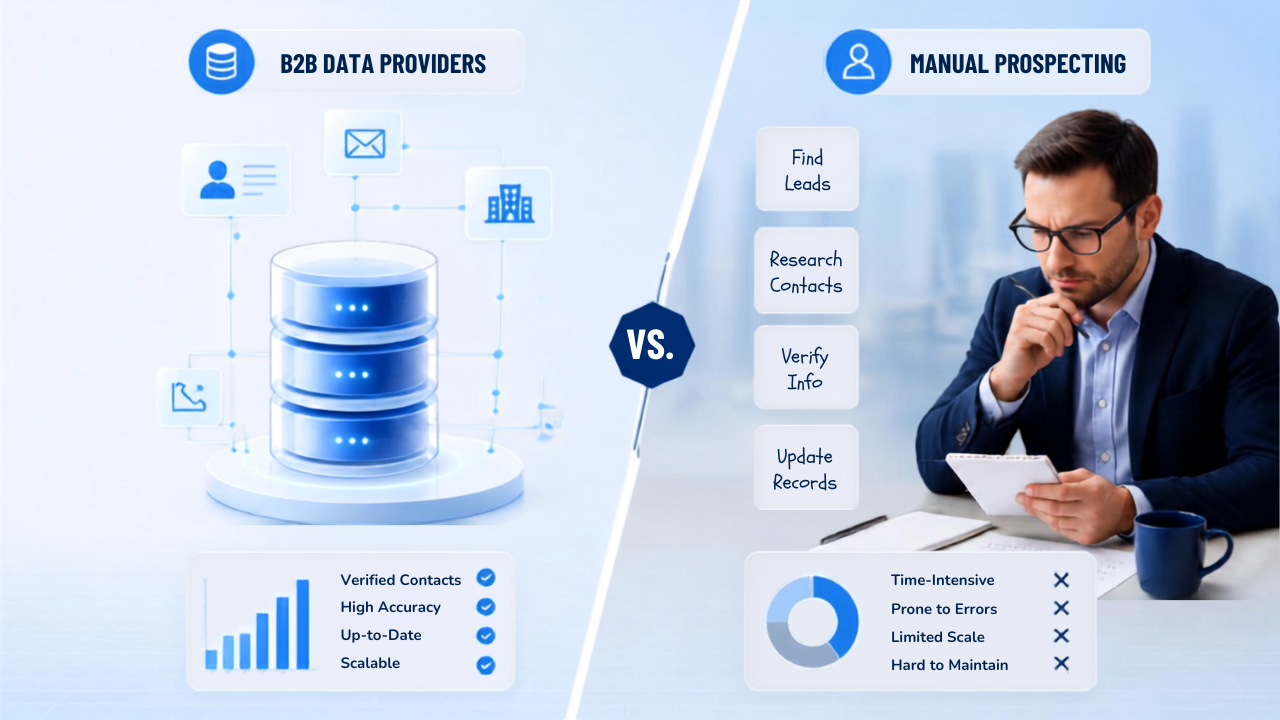
Evaluation factor | B2B contact data providers | Manual prospecting |
Speed | Builds large, filtered lists quickly. | Requires one record and one source at a time. |
Scale | Supports territory expansion and larger campaigns. | Becomes difficult to manage as list size grows. |
Data consistency | Uses standardized fields and repeatable workflows. | Depends on the researcher’s process and attention to detail. |
Context | Provides structured company and contact attributes. | Can uncover richer, account-specific business context. |
Freshness | Depends on the provider’s refresh and verification process. | Can be current when researched immediately, but may still become outdated. |
Targeting | Filters can support ICP-based prospecting by industry, location, role, size, and other attributes. | Allows highly customized judgment, but takes longer. |
Cost structure | Software or data subscription plus internal review time. | Primarily internal labor, tools, and opportunity cost. |
Workflow integration | Often supports CRM exports, APIs, enrichment, and verification. | Frequently involves manual copying and cleanup. |
Risk | Bad data can create bounce, compliance, and reputation problems if not checked. | Inconsistent sourcing can create gaps, duplicates, and undocumented assumptions. |
Best use | Repeatable list building, enrichment, segmentation, and sales development. | Strategic account research, personalization, qualification, and high-value opportunities. |
The right question is therefore not whether one approach is universally superior. It is which parts of prospecting should be automated and which parts require human judgment
How B2B Contact Databases Improve Sales Prospecting Efficiency
B2B contact databases help sales teams spend less time searching for prospects and more time engaging with the right decision-makers. By providing organized, up-to-date contact information and targeting filters, these tools can streamline prospecting, improve list quality, and make outreach efforts more efficient.
1. They reduce time spent finding basic contact information
Sales representatives should spend more time understanding a buyer’s problem and less time searching five websites for a job title and a business email address. A prospecting database centralizes the initial research layer, allowing teams to create a usable target list faster.
2. They make ICP-based prospecting repeatable
An ICP describes the companies most likely to benefit from a product or service. A good B2B data provider lets users translate that definition into filters such as industry, geography, company size, seniority, department, role, and technology environment.
ReachStream says users can filter prospects using more than 20 data points, including industry, company size, location, and job title. This type of structured search is useful because it turns an abstract ICP into an operational workflow.
3. They support territory and market expansion
Manual research may work for a small named-account list. It becomes less practical when a team wants to test a new region, segment a vertical, or identify hundreds of companies with similar characteristics. A global business database can accelerate the first-pass market map while leaving final prioritization to the sales team.
4. They reduce repetitive CRM work
Exports, integrations, and APIs help move contact data into the systems where sales and marketing teams already work. ReachStream lists CRM-ready exports and integrations as part of its prospecting workflow. The operational benefit is not only speed; it is also fewer opportunities for transcription errors and duplicate records.
5. They make verification part of the process
A contact record can look complete and still contain an invalid email, a changed job title, or an outdated company affiliation. Providers that include email verification allow teams to check deliverability before launching a campaign. ReachStream offers a separate Email Verifier designed to identify invalid addresses, detect catch-all domains, reduce bounce rates, and protect sender reputation.
Verification does not make every record permanently correct. It reduces avoidable errors at the moment of use. Teams should still confirm that the person is relevant, the company fits the ICP, and the outreach has a legitimate business purpose.
Manual Prospecting vs. Automated Prospecting: The Real Trade-Off
Automated prospecting is most valuable when the task is structured, repetitive, and rules-based. Manual prospecting is most valuable when the task requires interpretation, empathy, and account-specific judgment.
Automation is usually better for:
- Building an initial list from a defined ICP.
- Applying the same filters across multiple markets.
- Finding contacts by role, seniority, department, or location.
- Enriching existing CRM records.
- Checking email validity before an outbound campaign.
- Routing records to sales representatives according to territory or segment.
- Monitoring repeatable signals that indicate a possible buying opportunity.
Human research is usually better for:
- Deciding whether an account is genuinely strategic.
- Understanding a company’s priorities and business model.
- Interpreting ambiguous job titles or organizational structures.
- Writing a credible, relevant opening message.
- Selecting the right stakeholder in a complex buying committee.
- Reviewing sensitive or unusual data.
- Qualifying whether outreach is appropriate and timely.
This division of labor is also where AI prospecting and AI SDR solutions can help. An AI SDR solution may summarize accounts, suggest contacts, classify leads, or assist with sequencing. However, AI output is only as useful as the data and rules behind it. An automated system can scale an excellent process, but it can also scale irrelevant targeting and poor messaging.
AI Prospecting vs. Manual Outreach
AI prospecting and manual outreach are not opposites. They operate at different layers of the sales process.
AI prospecting helps identify, organize, score, and prioritize potential buyers. It can reduce manual prospecting time by handling repetitive searches, enrichment, segmentation, and first-pass analysis.
Manual outreach is the human-controlled communication layer. It is where a salesperson decides what to say, why the message is relevant, and whether the timing makes sense.
The strongest workflow is often:
Use automation to narrow the universe. Use people to earn the conversation.
For example, a sales team can use a B2B data provider to find operations leaders at mid-market logistics companies in a target region. A representative can then review each selected account, look for a relevant trigger, validate the role, and write a short message tied to that business context.
That is more effective than sending the same generic email to every record in a database.
Which B2B Contact Data Services Offer the Most Accurate Leads?
No provider can guarantee that every contact record will remain accurate indefinitely. People change jobs, companies restructure, domains change, and businesses close. Accuracy should therefore be evaluated as an ongoing operating capability rather than a single marketing number.
When comparing B2B data suppliers, assess the following:
Data-quality question | Why it matters |
How is a record collected? | Reveals whether the provider relies on public sources, partners, user contributions, research, or a combination. |
How frequently is data refreshed? | A refresh process helps reduce stale job titles, domains, and company details. |
Is the email verified before export? | Reduces the risk of sending to invalid addresses. |
Are risky or catch-all domains identified? | Helps sales teams make better decisions before sending. |
Can you filter by role, seniority, industry, and geography? | Determines whether the database can support a precise ICP. |
Does the provider cover your niche and target markets? | Large databases may still be weak for specialized industries or regions. |
Can you test a sample before buying at scale? | Lets your team measure match rate, completeness, and deliverability for its own ICP. |
Are privacy and compliance responsibilities documented? | Helps legal and marketing teams establish an appropriate use process. |
Does the data flow into your CRM? | Determines whether the platform saves time after the search. |
Are credits, exports, and usage limits clear? | Prevents unexpected operational and budget constraints. |
ReachStream positions its platform around global company and contact discovery, targeted filters, CRM-ready exports, and email verification. Its pricing page currently presents Prospect for B2B lead generation and Email Verifier for list hygiene, with no-credit-card-required calls to action and a free-lead offer. Teams should still run their own sample test before adopting any B2B contact database provider.
Comparing the ROI of a Data Service with Internal Research
The ROI comparison should include more than the monthly subscription price. The real cost of manual prospecting includes employee time, management overhead, inconsistent data entry, missed opportunities, and the delay before sales activity begins.
A simple model is:
Manual prospecting cost
research hours × fully loaded hourly cost + research tools + data cleanup + opportunity cost
Provider-assisted prospecting cost
platform cost + verification cost + review hours × fully loaded hourly cost + campaign cost
The provider-assisted approach is attractive when it reduces enough research time and improves enough data quality to create more qualified conversations. It is less attractive when the team buys a large database but has no clear ICP, no review process, or no plan to use the data.
Example ROI calculation
Assume a sales development representative spends 20 hours each month researching 200 prospects. If the fully loaded cost of that time is $35 per hour, research labor alone costs $700 per month.
If a prospecting platform reduces research time to eight hours, the remaining labor cost is $280. A $99 monthly subscription would bring the direct monthly cost to $379 before campaign costs. The illustrative saving is $321 per month, or $3,852 annually.
This is not a guaranteed result. It is a framework for testing the business case. The team should measure:
- Time to build a qualified list.
- Percentage of records matching the ICP.
- Email verification and bounce rates.
- Positive reply rate.
- Meetings created per 100 researched contacts.
- Opportunities and revenue sourced from the segment.
- Hours returned to sales representatives for selling and follow-up.
The most important metric is not the number of contacts exported. It is the number of qualified conversations created per unit of time and spend.
Pros and Cons of Automated B2B Contact Databases
Advantages
Scale: Teams can research more accounts without increasing research labor linearly.
Consistency: Standardized fields and filters make prospecting easier to repeat across representatives and territories.
Speed: A sales team can move from ICP definition to a first-pass list in minutes rather than days.
Operational efficiency: CRM exports, APIs, browser extensions, and email verification reduce copying and cleanup.
Segmentation: Firmographic and contact filters support account-based marketing, territory planning, and vertical campaigns.
Limitations
Data decay: Contact information changes. Even a verified record needs periodic review.
False precision: A database may make a prospect look like a perfect fit because of a few matching fields, while missing the account’s actual priorities.
Over-automation: Automated prospecting can produce generic campaigns at high volume if human review is removed.
Coverage gaps: Some industries, regions, company sizes, and job functions may be represented unevenly.
Compliance obligations: Buying data does not transfer the sender’s legal responsibility for how the data is used.
Cost without process: A platform cannot compensate for unclear positioning, weak messaging, poor qualification, or an undefined ICP.
How to Build a Hybrid Prospecting Workflow with ReachStream
Step 1: Define the ICP before opening the database
Document the firmographic and role-based characteristics of a good customer. Include exclusions. For example, define target industries, employee ranges, geographic markets, revenue bands, technologies, job functions, and buying triggers.
Step 2: Build a focused account list
Use ReachStream Prospect to search for companies and contacts that match the ICP. Start with a narrow segment instead of exporting every possible record. A smaller, more relevant list makes quality easier to evaluate.
Step 3: Prioritize accounts with human judgment
Review the account’s website, product, market, recent activity, and organizational context. Confirm that the selected contact can influence the problem your product solves.
Step 4: Verify contact data before outreach
Run addresses through an email verification process. Remove invalid records, flag risky results, and avoid treating an email address as proof that the contact is a qualified buyer.
Step 5: Add a reason to reach out
Write a specific reason for contacting the person. A relevant message can reference a business change, operational challenge, market shift, or role-specific responsibility. Avoid pretending to know something that has not been verified.
Step 6: Use AI as an assistant, not an unchecked sender
AI can help summarize public company information, propose message variations, classify accounts, and identify missing fields. Require review before an AI SDR solution sends messages at scale.
Step 7: Measure and improve the segment
Track deliverability, positive responses, meetings, pipeline, and revenue by segment. If a segment underperforms, change the ICP, offer, message, or timing before simply increasing volume.
Compliance: A Data Provider Does Not Remove Your Responsibility
Contact data sourcing should always be paired with a lawful and respectful outreach process. In the United States, the Federal Trade Commission states that the CAN-SPAM Act applies to commercial email, including business-to-business email. Requirements include accurate header information, non-deceptive subject lines, a valid physical postal address, a clear opt-out mechanism, and prompt handling of opt-out requests.
In the United Kingdom, the Information Commissioner’s Office explains that the Privacy and Electronic Communications Regulations treat corporate subscribers differently from sole traders and some partnerships. B2B marketers must not disguise their identity and must provide a valid opt-out address. If personal data is involved, UK GDPR obligations can also apply.
Before using a prospecting database, establish a documented process for:
- Checking the legal basis and jurisdictional requirements for your campaign.
- Distinguishing corporate subscribers from individuals, sole traders, and partnerships where relevant.
- Including accurate sender details and a clear unsubscribe mechanism.
- Maintaining suppression and do-not-contact lists.
- Honoring objections promptly.
- Limiting data access to authorized users.
- Reviewing provider terms, privacy documentation, and data-use permissions.
- Avoiding sensitive personal data and irrelevant targeting.
This article is educational, not legal advice. Consult qualified counsel for your markets and campaign structure.
Conclusion
Use Data to Accelerate Research, Not Replace Judgment
Manual prospecting remains valuable because sales is contextual. A buyer is more than a job title, and a company is more than a row in a business database. At the same time, asking sales representatives to manually discover, verify, format, and update every prospect is an expensive use of skilled time.
B2B contact data providers solve the scale and efficiency problem. AI prospecting can reduce repetitive work further. Human sales and marketing professionals still need to decide who matters, why the conversation is relevant, what to say, and when to reach out.
For teams looking to make that balance practical, ReachStream combines B2B prospect discovery, structured filters, business contact data, CRM-ready exports, and email verification in a single prospecting workflow. Build a more focused list, verify it before sending, and use human insight to turn contact data into meaningful business conversations.
Claim 100 free leads to see data quality in action
Frequently asked questions
1. Are B2B contact data providers better than manual prospecting?
They are better for speed, scale, structured filtering, enrichment, and repetitive research. Manual prospecting is better for account context, qualification, personalization, and high-value strategic research. A hybrid process usually delivers the best balance.
2. How do AI SDR solutions reduce manual prospecting time?
AI SDR solutions can automate parts of account discovery, contact prioritization, data enrichment, research summaries, and sequencing. They reduce manual prospecting time when the inputs and rules are reliable. Human review remains important for relevance, accuracy, tone, and compliance.
3. What is the difference between a B2B database provider and a B2B data supplier?
The terms are often used interchangeably. A B2B data supplier may provide a file or feed of business information. A B2B database provider typically offers a searchable platform with filters, verification, integrations, enrichment, and ongoing access.
4. Is a large business contact database automatically accurate?
No. Size describes coverage, not accuracy. Evaluate refresh frequency, verification, match rate for your ICP, invalid-record handling, niche coverage, and your own campaign results.
5. Should a small sales team buy a prospecting database?
It can make sense when the team has a defined ICP and spends substantial time finding or cleaning contact data. Start with a small test segment and compare time saved, data quality, deliverability, and qualified meetings before committing to a larger plan.
6. Can I automate outreach immediately after exporting contacts?
You should not. First validate the ICP, review the records, verify email addresses, check applicable marketing rules, personalize the message, and set up suppression handling. Automation should improve relevance and consistency, not merely increase send volume.
Manohar Devadiga
Marketing professional, specializing in SEO, content strategy, social media, performance marketing, prospecting, and demand generation.
Share
Table of Contents
Access 500M+ verified business emails and grow your sales pipeline effortlessly.
Power Your Sales nwith Targeted Data
Don't forget to share this post!















Check out our other blogs!
ReachStream’s Direct Dial Database: What Makes It Different
November 4, 2026
The B2B Outbound Playbook: From ICP to First Meeting
November 4, 2026
What Is Prospecting? A Beginner’s Guide for Sales Teams
November 3, 2026