



Unlimited Data.
Infinite Possibilities.
Looking for B2B data? Download Unlimited data using our Chrome extension at just $79/month.

Clay Pricing Explained: Plans, Features, and Costs in 2026

Clay Pricing Guide Plans, Credits, and Costs

Best Tips on Lead Generation for Technology Companies

Summarize this article with AI:

Clay’s credit-based pricing looks simple on the surface—plans range from free to enterprise, with credits fueling everything you do. But the real cost per lead? That depends on how many data sources you stack, whether you’re using AI features, and how often you hit your credit ceiling mid-month.

This guide breaks down each Clay plan, explains how credits actually work, and covers the hidden costs that don’t appear on the pricing page. You’ll also find a framework for choosing the right tier and alternatives worth considering if the credit math doesn’t add up for your team.

What is Clay Pricing

Clay is a B2B data enrichment and workflow automation platform built for go-to-market teams. Rather than charging per user like most SaaS tools, Clay runs on a credit-based model. You pay for what you consume, whether that’s pulling contact data, running automations, or calling AI features. Paid plans start around $134/month when billed annually, with a free tier available for testing.

The credit system gives you flexibility, but it also makes budgeting less predictable. Every enrichment call, every workflow step, and every AI-generated message draws from your credit balance. So your actual monthly cost depends entirely on how heavily you use the platform.

Clay Pricing Plans Breakdown

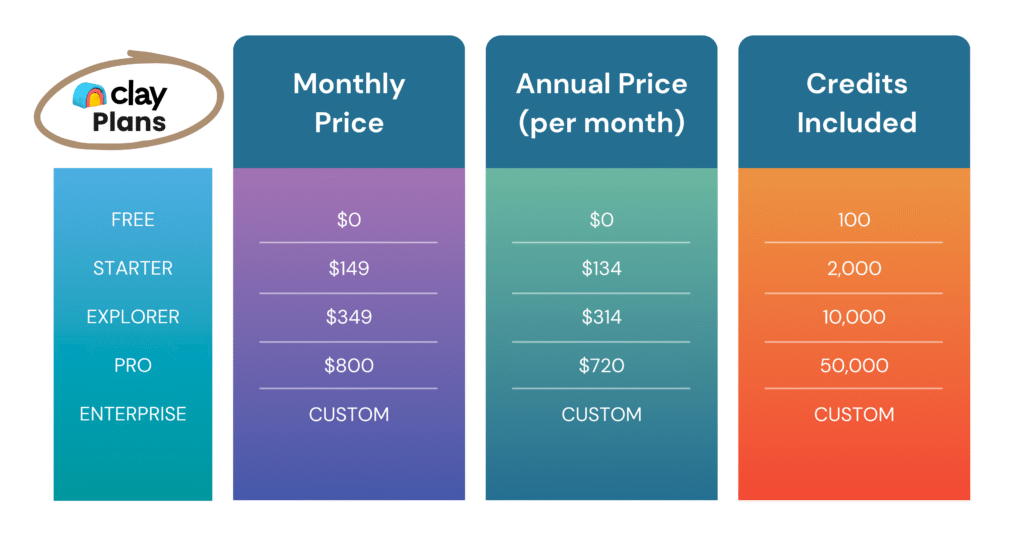
Clay offers five tiers, each with different credit allotments, feature access, and price points. Here’s a side-by-side comparison:

Free Plan and Trial Access

The free tier gives you 100 credits to explore Clay’s interface and test basic workflows. That’s enough to understand how the platform works, but not enough for real prospecting at scale. No credit card required, which makes it genuinely risk-free for evaluation.

Starter Plan

At $134/month on annual billing, Starter unlocks 2,000 credits and removes some free-tier restrictions. This tier fits solo founders or individual SDRs running light outbound campaigns. Keep in mind that 2,000 credits can disappear quickly if you’re enriching leads across multiple data sources per contact.

Explorer Plan

Explorer jumps to $314/month on annual billing with 10,000 credits. You also get access to more integrations and higher workflow limits. Growing sales teams typically land here because it offers enough capacity for consistent outbound without constant top-ups.

Clay Pro Plan

Pro costs $720/month on annual billing and includes 50,000 credits plus native CRM integrations with Salesforce and HubSpot. This tier unlocks team collaboration features and advanced workflow capabilities. If your revenue operations depend on syncing enriched data directly to your CRM, Pro is likely your minimum viable option.

Enterprise Plan

Enterprise pricing requires a sales conversation. You get custom credit allotments, dedicated support, SSO, and advanced security certifications. Large organizations with compliance requirements or multi-team deployments typically land here.

Clay Hidden Costs the Pricing Page Skips

The listed plan prices tell only part of the story. Several costs sit outside the standard pricing page, and they can significantly impact your total spend.

LinkedIn Sales Navigator Add-On

Many of Clay’s most powerful prospecting workflows rely on LinkedIn data. Sales Navigator is a separate subscription that Clay doesn’t include. If LinkedIn prospecting is central to your strategy, add this line item to your budget.

Top-Up Credit Markup Fees

Run out of credits mid-cycle? You can purchase more, but top-up credits cost significantly more per credit than your base plan rate. Teams that consistently exceed their allotment often find upgrading to a higher tier more economical than buying top-ups repeatedly.

CRM Integration Limits by Plan

Salesforce and HubSpot integrations require the Pro plan or higher. Teams on Starter or Explorer face manual CSV exports to get data into their CRM. That workflow adds time and introduces data hygiene risks that compound over months.

Time and Learning Curve Tax

Clay is powerful but complex. The platform has a steeper learning curve than simpler alternatives, and many teams invest in consultants or Clay experts to build their initial workflows. This isn’t a line item on the pricing page, but it’s a real cost worth acknowledging.

The Real Cost Per Enriched Lead on Clay

Here’s where credit-based pricing gets tricky. A single enriched lead rarely costs just one credit.

Picture a typical enrichment workflow. You want to find a prospect’s verified email, company size, tech stack, and LinkedIn profile. Each of those data points might come from a different provider, and each provider consumes credits at its own rate. Stack four or five enrichments together, and a single lead could cost 10 to 20 credits or more.

Before committing to a plan, map out your typical enrichment workflow. Count the credits per lead, then multiply by your target monthly volume. That calculation gives you a much clearer picture than the plan’s headline credit number alone.

Which Clay Plan Fits Your Team

Choosing the right tier depends on your workflow complexity, lead volume, and integration requirements. Here’s a quick framework:

  • Solo founders or freelancers: Start with Free or Starter to test workflows before scaling spend.
  • Growing sales teams (5-15 reps): Explorer typically provides enough credits for consistent outbound without constant top-ups.
  • Revenue teams with CRM workflows: Pro is often the minimum for teams that require native Salesforce or HubSpot sync.
  • Enterprise organizations: Custom plans make sense when you have governance, security certifications, or multi-team access control requirements.

Top Clay Alternatives to Consider

Clay’s credit complexity and hidden costs push some teams toward simpler alternatives. If you’re evaluating options, here are three platforms worth comparing.

1

ReachStream

ReachStream takes a different approach. There’s no credit system to track, and pricing is transparent from the start. The platform offers verified B2B data with 90% deliverability and 95% accuracy across 200M+ contacts. The free IceBreaker plan includes 100 export credits and unlimited contact views, so you can test the platform without calculating credit burn. Explore ReachStream’s straightforward pricing.

2

Apollo.io

Apollo offers comparable enrichment and outreach features with a different pricing structure. It’s popular among teams that want sequencing and data in one platform. Costs can escalate at higher volumes, so compare carefully against your projected usage.

3

ZoomInfo

ZoomInfo is the enterprise-grade option with the price tag to match. It offers deep company intelligence and intent data but typically requires annual contracts with significant minimums.

Is Clay Pricing Worth It for B2B Teams

Clay delivers genuine value for technical teams running complex, multi-source enrichment workflows. If you have the expertise to build sophisticated automations and the budget to absorb variable credit costs, it’s a powerful platform.

On the other hand, teams with simpler requirements often find the credit system adds complexity without proportional benefit. If you primarily want verified contacts, basic enrichment, and clean CRM data, the hidden costs and learning curve can outweigh the flexibility.

Explore ReachStream's pricing to compare.

FAQs

Does Clay offer annual billing discounts?

Yes, Clay reduces monthly rates when you commit to annual billing. The savings typically range from 10-15% compared to month-to-month plans.

Can I cancel or pause my Clay subscription?

You can cancel your Clay subscription, though refund policies and pause options vary by plan tier. Check Clay’s terms of service or contact support for specifics on your situation.

How do I estimate my monthly Clay credit usage?

Map your enrichment workflow step by step. Count how many data sources you’ll query per lead, then multiply by your expected monthly lead volume. Add a buffer for AI usage and workflow iterations to avoid mid-cycle surprises.

What happens when I exceed my Clay credit limit?

Your workflows pause until the next billing cycle begins. Alternatively, you can purchase top-up credits at a higher per-credit rate to resume immediately.

Are there Clay discounts for startups or nonprofits?

Clay occasionally offers startup programs with reduced pricing. Contact their sales team directly to ask about eligibility, as these programs aren’t always advertised publicly.

Table of Contents

Access 200M+ verified business emails and grow your sales pipeline effortlessly.

Claim Your 100 Free Export Credits Today!

Power Your Sales with Targeted Data

Don't forget to share this post!

Check out our other blogs!