Written by:

Abdul Kareem
Email Verification API 2026: Verify Emails at Scale
> Email Verification
How to Evaluate B2B Data Vendors for Accuracy and Compliance

TL;DR
- An email verification API confirms that an email address is valid and capable of receiving emails before you send to it.
- Real-time email verification catches typos at capture and protects sender reputation.
- Batch checks through an email verifier API suit cleaning existing lists before a campaign.
- Syntax checks alone will not catch catch-all domains, role-based inboxes, or disposable addresses.
- High bounce rates from unverified sends can get a domain flagged for months.
- Look for detailed statuses, not a pass or fail, when comparing email verification API solutions.
- ReachStream Email Verifier validates emails at scale with clear status codes.
- The right email API should fit your CRM, ESP, or outreach tool without extensive engineering effort.
If you’ve ever watched a cold email campaign quietly fail because half the list bounced, you already understand why teams rely on an email verification API. Most teams do not think about this until a domain gets flagged or a CRM fills up with dead contacts.
By 2026, mailbox providers have gotten stricter about what they let through. Bulk sender rules, spam trap detection, and engagement-based filtering all mean sending to unverified addresses carries more risk than it used to. One bad address is not a problem. Ten thousand of them can quietly damage a sender reputation that takes months to rebuild.
This guide explains what an email verification API does, how real-time verification differs from batch verification, and what to consider when comparing providers.
What Is a Email Verification API and Why It Matters
An email verification API is a service that validates email addresses automatically before they are added to your database or used in email campaigns. By integrating with your website, CRM, application, or lead capture forms, the API checks whether an email address is properly formatted, belongs to a valid domain, and can receive emails. Instead of finding out an address bounced after the fact, you find out beforehand.
Most tools in this category check three layers:
- Syntax: does the address follow standard formatting rules
- Domain: does the domain exist and carry valid mail exchange records
- Mailbox: does the specific inbox exist and accept mail
A syntax check alone tells you almost nothing. It will pass “notreal@gmail.com” just as happily as a real inbox if the format looks correct, which is why teams relying only on format checks still see high bounce rates.
Tip
If your current process only checks for an “@” symbol and a plausible domain, you are formatting email, not validating email. Real validation confirms the mailbox itself exists.
How the Verification Process Works
When you request an email verifier API, a few things typically happen behind the scenes:
- The request parses the address and confirms it is structurally valid.
- It looks up the domain’s mail exchange records to confirm mail can route there.
- It runs a mailbox-level check, often an SMTP handshake, to see whether the receiving server accepts or rejects that address.
- It returns a status, ideally more detailed than a flat valid or invalid flag.
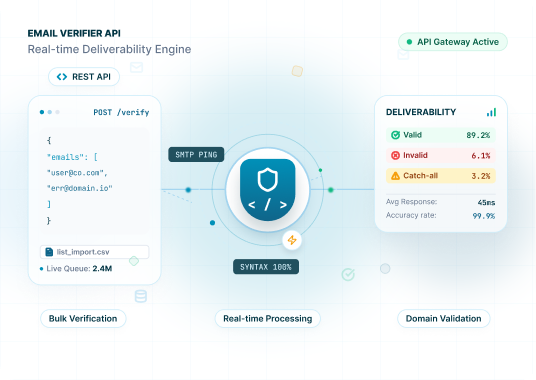
That last point matters most. A well-built email address validation API will not just tell you an address is good or bad, it will tell you why:
| Status | What It Means | What To Do |
|---|---|---|
|
Valid |
Mailbox exists and accepts mail |
Safe to send |
|
Invalid |
Mailbox does not exist or domain is dead |
Remove from list |
|
Risky |
Mailbox may exist but shows warning signs |
Send with caution or exclude |
|
Catch-All |
Domain accepts mail to any address |
Treat as unverified, monitor engagement |
|
Unknown |
Server did not respond conclusively |
Retry later or review manually |
|
Do Not Mail |
Role account, complainer, or suppression list |
Exclude |
Real-Time Verification vs Bulk Verification
Most teams end up needing both real time email validation and batch processing, for different jobs.
Real Time Email Verification
This runs at the point of capture, usually on a signup form or CRM field. The moment someone types an address, a check runs before the form submits, catching typos like “gmial.com” instead of “gmail.com” while the person can still fix it.
Best for: signup and lead capture forms, CRM data entry, demo request forms.
Bulk Verification
This processes a list of addresses at once, through a file upload or a bulk call to an email API. It suits cleaning an existing database or prepping a list before a cold outreach campaign.
Best for: pre-campaign list cleaning, quarterly database hygiene, verifying purchased or aggregated lists.
PRO TIP
Run real time checks at capture and batch verification on a recurring schedule, monthly or quarterly depending on volume. An address that was valid six months ago is not guaranteed to be valid today.
Key Features to Look For
Not every email validation API on the market checks the same things. A few features separate the useful email verification API tools from the surface-level ones.
- Detailed status codes, not just valid or invalid
- Catch-all detection, since these domains can quietly inflate a "valid" count
- Role-based and disposable address detection
- Real time and bulk endpoints on the same platform
- Batch limits that match your actual list sizes
- Compliance documentation, especially for contact data from the EU, California, Canada, or India
- Straightforward integration with your existing CRM, ESP, or outreach tool
Common Mistakes Teams Make
Even with an email verification API in place, a few common mistakes can reduce deliverability and increase bounce rates. Avoid these pitfalls to keep your contact database clean and your email campaigns performing at their best.
- Treating catch-all domains as automatically valid: Catch-all domains accept mail sent to any address, making it difficult to confirm whether a specific mailbox actually exists. Sending to every catch-all address can lead to higher bounce rates than expected.
- Verifying email addresses only once: Email data changes over time as people switch jobs, companies rebrand, or domains become inactive. A list verified months ago may no longer be accurate, so regular re-verification is essential.
- Skipping verification for referral or warm lists: Even trusted contact sources can contain typos, outdated addresses, or inactive mailboxes. Verify every email address before adding it to your outreach campaigns.
- Ignoring verification before sending: Every email address should pass verification before entering your active mailing list, regardless of where it came from. This simple step helps reduce bounce rates and protect your sender reputation.
Choosing the Right Provider
Picking between email verifier APIs usually comes down to a handful of practical questions.
- Does it support both real-time verification and batch uploads?
- What is the batch limit per upload?
- How granular are the statuses? A binary valid or invalid response gives less to work with than a detailed breakdown.
- Does it integrate with your CRM, ESP, or outreach tool without custom engineering work?
- What compliance certifications does the provider maintain?
- Is there a free tier to test accuracy against your own list first?
INDUSTRY INSIGHT
Deliverability guidance from major mailbox providers has consistently emphasized low bounce rates and near-zero complaint rates as a condition for reliable inbox placement. That is a big part of why email address validation has become a standard step in most outbound workflows.
A Practical Rollout Framework
Step 1:
Audit your current list: Run a batch pass on your existing database for a baseline bounce risk score.
Step 2:
Add real time checks at capture points: Wire verification into signup forms, demo requests, and CRM fields so new bad data stops coming in.
Step 3:
Segment by status: Route valid addresses to your primary sending flow, treat risky ones with a lighter touch, and suppress invalid ones.
Step 4:
Re-verify on a schedule: Monthly for high-velocity outbound teams, quarterly for smaller lists.
Step 5:
Track bounce rate: If verified sends still produce bounce rates above roughly 2 percent, something upstream needs a second look, whether that is list sourcing, verification settings, or send cadence.
QUICK CHECKLIST
- Batch-verified the existing database
- Real time checks wired into capture forms
- Segmentation rules set for valid, risky, and invalid statuses
- Recurring re-verification scheduled
- Bounce rate tracked as an ongoing metric
ReachStream Email Verifier: Amplifying Campaign Success
Whether you’re validating email addresses as they’re collected or cleaning large contact databases before a campaign, the ReachStream Email Verification API helps you maintain cleaner data, reduce bounce rates, and protect your sender reputation.
Designed for developers and businesses alike, the API supports both real-time email verification and bulk validation. You can integrate it with websites, signup forms, CRM platforms, marketing automation tools, and custom applications to automate email verification within your existing workflows. It also scales easily for bulk list cleaning, helping ensure only valid, deliverable email addresses remain in your database.
Key capabilities include:
- Comprehensive verification results: Receive clear verification statuses such as Valid, Invalid, Risky, Unknown, and Do Not Mail to make informed sending decisions.
- Multi-layer email validation: Combines syntax validation, domain and MX record checks, SMTP verification, catch-all detection, and additional quality checks for reliable results.
- Real-time and bulk verification: Validate email addresses instantly during lead capture or process large email lists efficiently before launching campaigns.
- Simple API integration: Connect the Email Verification API with CRM systems, websites, marketing platforms, and internal applications to automate email validation across your workflows.
- Built for scale: Process high volumes of email verification requests with fast response times and seamless integration into your existing technology stack.
Tip
Built for scale: Process high volumes of email verification requests with fast response times and seamless integration into your existing technology stack.
See How Your List Scores
Run a sample batch through ReachStream Email Verifier and see the status breakdown for yourself.
Why Email Verification Pays Off
Most email verification API solutions price around credits or per-check costs, with tiered discounts at higher volumes. Before comparing sticker prices, it helps to think about the cost of not verifying.
A bounced send does not just fail quietly. A pattern of high bounce rates can affect sender reputation for your whole domain, meaning reduced inbox placement for everything you send afterward, for weeks or months while you rebuild trust.
A simple way to frame it:
- Cost of verifying 10,000 addresses: a fixed, predictable line item.
- Cost of a damaged sender reputation: harder to quantify, but far higher and slower to recover from.
Ready to Integrate Email Verification into Your Workflow?
Use the ReachStream Email Verification to validate email addresses in real time across your applications. Keep invalid contacts out of your database from the start.
Conclusion
An email verification API is no longer optional for teams sending high volumes of outbound or lifecycle emails. Mailbox providers now place greater emphasis on bounce rates, and rebuilding a damaged sender reputation can take significant time. By integrating email verification into their data pipeline instead of treating it as a one-time cleanup task, businesses can maintain better deliverability and avoid costly email performance issues.
Whether you need real time checks at capture, batch cleaning for an existing database, or both, the core questions stay the same: how detailed are the results, how well does it fit your stack, and how well does it perform against your own data. ReachStream Email Verifier is worth testing directly, with 100 free credits on signup to run a real check before deciding on anything larger.
Start Verifying Emails for Free
Upload your list, verify every address, and improve deliverability before you hit send.
Frequently Asked Questions
1. What does an email verification API actually check?
It typically checks address syntax, whether the domain has valid mail exchange records, and whether the specific mailbox exists and accepts mail. More advanced tools also flag catch-all domains and disposable inboxes.
2. Is real-time verification different from bulk verification?
Yes. ReachStream Email Verifier supports both verification methods. Real-time verification checks an email address the moment it is entered into a form or application, preventing invalid contacts from entering your database. Bulk verification processes thousands of email addresses at once, making it ideal for cleaning CRM databases and marketing lists before a campaign.
3. How much can email verification reduce bounce rates?
The impact depends on the quality of your email list, but verifying addresses before sending is one of the most effective ways to reduce hard bounces. ReachStream Email Verifier identifies invalid, risky, and undeliverable email addresses so you can improve deliverability and protect your sender reputation.
4. What is a catch-all email address?
A catch-all domain accepts emails sent to any address within that domain, making it difficult to confirm whether a specific mailbox is actively monitored. ReachStream Email Verifier detects catch-all domains and flags them as Risky, helping you make informed decisions before sending email campaigns.
5. Can Email Verifier detect disposable emails?
Yes. ReachStream Email Verifier identifies disposable and temporary email addresses along with role-based accounts, catch-all domains, and other risky contacts. This helps you maintain higher-quality customer data and reduce unnecessary email bounces.
6. How often should I verify my email list?
For the best results, verify your email list regularly. High-volume outbound teams should verify monthly, while smaller databases can be cleaned quarterly. ReachStream Email Verifier makes ongoing email verification easy through both bulk uploads and real-time verification.
7. Does ReachStream Email Verifier offer a free trial?
Yes. New users receive 100 free verification credits upon signup, allowing them to test ReachStream Email Verifier with their own email lists before upgrading to a paid plan. No credit card is required to get started.
8. What do "Risky" verification results mean?
A Risky status indicates that an email address may be deliverable but has characteristics that could affect deliverability, such as catch-all domains or inconsistent mail server responses. ReachStream Email Verifier categorizes results as Valid, Invalid, Risky, Unknown, and Do Not Mail, making it easier to decide which contacts to include in your campaigns.
9. Can I use ReachStream Email Verifier with my CRM?
Yes. ReachStream Email Verifier supports bulk email verification for CRM exports, while the email verification API enables real-time verification within CRM systems, websites, signup forms, marketing platforms, and custom applications. This helps automate email verification and maintain clean contact data across your workflows.
Abdul Kareem
Author
Abdul Kareem

Abdulkareem Satarkar is Software Engineering Manager at ReachStream, leading the development of scalable software solutions for B2B sales and marketing teams.
Share
Table of Contents
Access 500M+ verified business emails and grow your sales pipeline effortlessly.
Power Your Sales
with Targeted Data
Abdul Kareem writes about B2B sales prospecting, email deliverability, and cold outreach for ReachStream, focusing on practical guidance that sales and marketing teams can put to use right away.
Don't forget to share this post!















Check out our other blogs!

ReachStream’s Direct Dial Database: What Makes It Different
November 4, 2026
The B2B Outbound Playbook: From ICP to First Meeting
November 4, 2026

What Is Prospecting? A Beginner’s Guide for Sales Teams
November 3, 2026