Written by:

Junaid Hussain Khan
Email Verification Guide: What It Is and Why It Matters
>Email Verification Guide
How to Evaluate B2B Data Vendors for Accuracy and Compliance

TL;DR
- Email verification confirms whether an address is real, active, and able to receive mail before you send to it.
- Bad data drives up bounce rates and damages sender reputation, which directly hurts deliverability.
- Verification methods range from basic syntax checks to real-time verification against the mail server.
- Email list decay is constant. Contacts change jobs and companies over time, so lists go stale even if the source was accurate at signup.
- The benefits go beyond avoiding bounces, including cleaner reporting and stronger email engagement.
- Common pitfalls include relying on a single check type and treating verification as a one-time task.
- Choosing the right provider comes down to accuracy, status detail, compliance, and how well it fits your workflow.
- ReachStream Email Verifier is a standalone tool built for teams that want a clear way to check lists before sending.
Introduction
If you have ever launched a cold outreach campaign only to see high bounce rates, you already know the cost of unverified data. Unreliable email addresses do not just fail quietly. They damage your sender reputation and quietly erode the return on every campaign you run.
This email verification guide breaks down what email verification is, how it works, and why it has become a standard step for sales professionals, SDRs, marketing teams, and RevOps leaders who depend on email to reach real people.
What Is Email Verification?
Email verification is the process that is used to determine the accuracy and deliverability of an email address. It helps you ensure that the recipient is valid, active, and able to receive emails before you send anything to it. Instead of finding out an address is dead after you hit send, verification tells you upfront whether it is safe to mail.
At its core, it looks at three things: whether the address is formatted correctly, whether the domain exists and accepts mail, and whether the specific mailbox is active. Basic email validation might only confirm formatting and domain existence. A fuller verification tool goes further and checks the mailbox itself, often through a real-time verification ping to the receiving mail server.
This distinction matters more than it sounds. Plenty of teams treat “validation” and “verification” as interchangeable, but validation usually stops at syntax and domain checks, while verification confirms deliverability at the mailbox level. Throughout this email verification guide, we use “verification” to mean the fuller check, since that is what actually protects your sender reputation.
Tip
If a tool only tells you an email “looks valid,” ask whether it performed a mailbox-level check. Syntax checks alone will not catch a full inbox or a mailbox that was closed last month.
Why Email Verification Matters
Every B2B email list decays over time. People change jobs, companies get acquired, domains get retired, and inboxes fill up. This is email list decay, and it happens whether you notice it or not.
The practical consequence shows up in your bounce rates. Email providers like Gmail, Outlook, and Yahoo consider signals such as how often mail from your domain bounces or gets marked as spam. Cross a certain threshold and your emails start landing in spam folders, even for contacts who genuinely want to hear from you. That is why email delivery and list hygiene are so closely tied together, a link this email verification guide keeps coming back to.
For sales professionals and SDRs, the stakes are direct. A cold outreach sequence built on unverified data wastes rep time chasing addresses that never existed. For email marketers running campaigns at scale, a handful of bad addresses can quietly erode engagement metrics and skew reporting.
Expert Insight
Experienced revenue teams treat verification as a recurring habit, not a one-time cleanup. Lists sourced months ago need a re-check before a new send, since email list decay does not pause between campaigns.
How Email Verification Works
Modern verification tools typically layer several checks together rather than relying on just one. Here are the main email verification methods you will run into.
- Syntax check: Confirms the address follows standard formatting, such as having an "@" symbol and a valid domain structure. Catches obvious typos, nothing else.
- Domain and MX record check: Confirms the domain exists and has mail exchange (MX) records configured to receive mail. No MX records means no email.
- Disposable and role-based detection: Flags temporary inboxes and generic addresses like info@ or support@, which tend to have low engagement.
- SMTP or real-time verification: Connects to the receiving mail server and checks whether the specific mailbox exists, without sending an actual email.
- Catch-all detection: Identifies domains configured to accept mail for any address, which makes a specific mailbox harder to confirm.
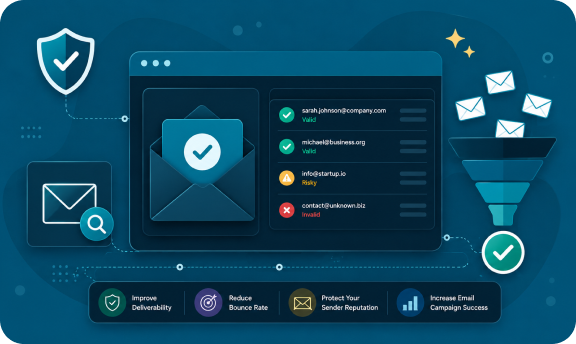
Most well-built platforms return a status for each address instead of a flat yes or no. Common statuses include Valid, Invalid, Risky, Catch-All, Unknown, and Do Not Mail, each pointing to a different next step for the sender.
Pro Tip
Do not treat “Risky” and “Invalid” the same way. Risky addresses, often catch-all or low-confidence domains, can sometimes be worth a cautious, low-volume send, while Invalid addresses should be removed outright.
Benefits of Email Verification
The benefits go beyond avoiding bounces, though that is the most immediate one.
- Protects sender reputation: Mailbox providers watch bounce rates and spam complaints closely.
- Improves deliverability: Fewer bad addresses means more email reaches the inbox instead of getting filtered.
- Saves rep and marketer time: SDRs and email marketers stop chasing dead contacts.
- Makes reporting more accurate: Open, click, and reply rates mean more when calculated against real, reachable addresses.
- Supports stronger email engagement: Sending to real inboxes correlates with healthier engagement over time.
- Reduces compliance risk: Verifying addresses before a send supports responsible list hygiene under data protection regulations.
Industry Insight
Deliverability specialists generally treat bounce rate and spam complaint rate as two of the strongest signals mailbox providers use to judge sender reputation, which is part of why routine list verification has become standard practice for serious email marketing programs.
Pitfalls of Email Verification
Not every approach is equally reliable. A few mistakes come up often enough to call out.
Common Mistake
Relying on a single check type. A tool that only performs syntax checks will approve plenty of addresses that bounce the moment you send to them.
- Treating verification as a one-time event: A list checked six months ago is not the same list today.
- Ignoring catch-all domains: These addresses often show as "safe to send" when they are really just uncertain.
- Skipping checks before cold outreach: Sending emails to an unverified list in a cold sequence quickly triggers spam filters on a fresh domain.
- Overlooking role-based and disposable addresses: These may technically be deliverable but rarely convert.
- Choosing a provider based on speed alone: A fast checker that trades away accuracy can leave risky addresses in your list.
Best Practice
Build verification into your workflow at two points: once when a contact enters your database, and again shortly before a major campaign.
Types of Email Verification Platforms and Tools
As this email verification guide has touched on already, not every provider works the same way. Providers generally fall into a few categories.
| Type | What It Does | Best For |
|---|---|---|
|
Standalone verifier |
Focused purely on checking and cleaning lists |
Teams that already have a data source and just need verification |
|
Built into a CRM or ESP |
Verifies addresses as part of a broader platform |
Teams that want it tied into existing workflows |
|
Bulk email checker |
Processes large lists in batch uploads |
List cleanups, database audits, one-time large jobs |
|
API-based |
Verifies in real time as addresses are captured, often on signup forms |
Product and growth teams verifying at the point of collection |
A standalone tool tends to be simple to adopt and does not require switching your existing CRM, while a built-in option can save a step if verification is only one part of what you need.
Try ReachStream Email Verifier for Free
Check any list with real-time email verification and get a clear status for every address, without committing to a full platform switch.
Real-Time Verification vs Bulk Email Checking
These two approaches solve different problems, and most teams end up needing both.
Real-time verification checks an address the moment it is captured, often through an API call on a signup form or CRM entry point. It suits founders and growth teams who want clean data from day one, and recruiters and agencies verifying candidate or client emails on intake.
Bulk email checking is built for the opposite scenario: you already have a list, sometimes tens of thousands of contacts, and need to verify it in one pass. This is common before a large campaign or during a periodic database cleanup.
Quick Checklist
- Are you collecting new contacts through forms or signups? Real-time verification protects data quality at the source.
- Do you have an existing list you have not checked recently? A batch pass should come first.
- Running both new collection and periodic sends? You likely need both approaches together.
How to Choose an Email Verification Service
With so many providers on the market, the decision usually comes down to a handful of factors.
- Accuracy and status detail: Look for clear, specific statuses (Valid, Invalid, Risky, Catch-All, Unknown, Do Not Mail) rather than a vague pass or fail.
- Compliance posture: Checking whether a provider addresses frameworks like GDPR, CCPA, PIPEDA, and DPDPA, and holds recognized certifications, is worth the extra five minutes.
- Batch limits and speed: If you regularly verify large lists, check the upload limit and how quickly results come back.
- Ease of integration: How well the tool fits your existing stack affects how quickly your team will actually use it.
- Free tier or trial credits: Testing accuracy against a sample of your own list before committing is one of the more reliable ways to evaluate an email verification solution.
Expert Insight
Experienced ops and RevOps teams rarely choose a verification tool on accuracy claims alone. They run a side-by-side test against a known sample list, comparing results from two or three providers before deciding.
ReachStream Email Verifier is a dynamic tool designed, with five distinct statuses, support for batch uploads, and free credits available on signup so teams can test accuracy against their own data before committing to a plan.
Talk to Sales
Have questions about verifying a large or complex list? Our team can walk through your specific use case.
Best Practices for Email List Verification
Every recommendation in this email verification guide points toward the same conclusion: a few habits separate teams with consistently healthy deliverability from teams that keep fighting bounce and spam problems.
- Verify before every major send, not just when a list feels old.
- Segment by status. Send confidently to Valid addresses, treat Risky and Catch-All with caution, and remove Invalid and Do Not Mail outright.
- Warm up new sending domains gradually, since even a clean list can trigger spam filters at high volume.
- Re-check lists sitting unused for a few months, given how quickly email list decay sets in.
- Track bounce rates over time to catch a slow decline before it becomes a problem.
- Document your verification cadence so it survives team turnover.
Pro Tip
If your email marketing strategy includes re-engagement campaigns for dormant subscribers, verify that segment separately. Dormant addresses are disproportionately likely to have gone stale.
Conclusion
Email list decay is not a hypothetical risk. It happens steadily, in the background, regardless of how good your data source was on day one. Teams that maintain strong deliverability are usually the ones that treat verification as a routine practice rather than a one-time fix.
This email verification guide has covered what verification actually checks, the methods behind it, the benefits and pitfalls worth knowing, and how to evaluate a provider against your own needs. The short version: verify before you send, segment by status, and re-check lists that have gone quiet for a while.
If you are ready to see how your own list holds up, ReachStream Email Verifier gives you a straightforward way to check it, with clear statuses for every address and free credits to get started.
Try ReachStream Email Verifier Free
See exactly which addresses on your list are safe to send to, before you hit send.
Frequently Asked Questions
How is email verification different from email validation?
Validation usually refers to basic checks like correct formatting and domain existence. Verification goes further and often includes a real-time check against the mail server to confirm the mailbox itself is active.
How often should I verify my email list?
Most teams verify before every major campaign and re-check any list that has been sitting unused for a few months, since email list decay happens continuously.
What does a "Catch-All" status mean?
The receiving domain is configured to accept mail sent to any address at that domain, which makes it difficult to confirm whether one specific mailbox is genuinely active.
Can I verify emails in bulk?
Yes. A bulk email checker lets you upload a list and verify many addresses in a single batch, useful for cleaning up an existing database or auditing a purchased list.
Is real-time verification necessary to run bulk checks?
Real-time catches bad data the moment it is captured, while batch checks clean up lists you already have. Most mature workflows use both.
What should I do with addresses marked "Risky"?
Treat them with caution. Some teams send at low volume as a test, while others exclude them entirely for high-stakes campaigns.
Is ReachStream Email Verifier free to try?
With ReachStream Email Verifier, you get a free trial for 30 days with 100 credits on signup, which lets you test accuracy against a sample of your own list before upgrading to a paid plan.
Junaid Hussain Khan
Author
Junaid Hussain Khan

Brand Growth & Strategy at ReachStream, where he drives content, SEO, and growth strategy for B2B sales and marketing teams.
Share
Table of Contents
Access 500M+ verified business emails and grow your sales pipeline effortlessly.
Power Your Sales
with Targeted Data
Junaid Hussain Khan is a Senior Manager, Business Development at ReachStream. He leads strategic partnerships, uncovers new market opportunities, and helps drive ReachStream's growth and its position in the B2B ecosystem.
Don't forget to share this post!















Check out our other blogs!
ReachStream’s Direct Dial Database: What Makes It Different
November 4, 2026
The B2B Outbound Playbook: From ICP to First Meeting
November 4, 2026
What Is Prospecting? A Beginner’s Guide for Sales Teams
November 3, 2026