How to Evaluate B2B Data Vendors for Accuracy and Compliance
Written by:

Junaid Hussain Khan
How Real-Time Email Verification Works
>How Real-Time Email

TL;DR
- Real-time email verification checks whether an inbox actually exists at the moment you submit an address, instead of relying on a stored list from weeks or months ago.
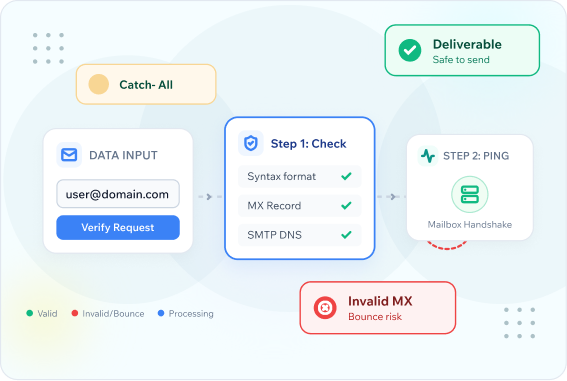
- The process runs through several technical steps: syntax check, domain and MX record lookup, an SMTP handshake, and disposable email address detection.
- Real time email verification catches problems that a simple format check misses, including full inboxes, closed accounts, and catch-all domains.
- Bounce rates directly affect sender reputation, so validating email addresses before a send protects every future campaign, not just the current one.
- Free email validation options exist for testing small batches, while free bulk verification is usually capped at a set number of credits.
- An Email Verification API lets you validate the email address at the point of collection, such as on a signup form, rather than after the fact.
- ReachStream Email Verifier checks each address against six verification statuses and offers a 30-days free trial with 100 credits to test accuracy before you commit to a paid plan.
What Real-Time Email Verification Actually Checks
Real-time email verification confirms whether an email address exists and can receive mail, checked at the exact moment you submit it rather than against a stale, previously collected list. That distinction matters more than it sounds. An address that was valid three months ago might belong to someone who left the company, closed the account, or let the inbox fill up since then.
Most people confuse this with a simple format check. Confirming that an address looks like name@company.com is not the same as confirming the email address exists. Real email validation goes several steps further, checking the domain, querying the mail server, and flagging patterns associated with fake email or disposable email addresses. Teams that validate email addresses before sending emails consistently see fewer bounces than those who clean their list only after a campaign underperforms.
This article serves as a practical email verification guide covering what real-time email verification actually checks, the technical steps involved, how it differs from bulk verification, and what to look for in an email verification tool if you decide to add one to your stack.
Tip
Before choosing any email validator, ask whether it performs a live SMTP check or only validates format and domain. That single difference separates a real verification tool from a glorified spell checker.
The Technical Steps Behind the Process
Real time email verification is not one check, it is a short sequence of checks that each catch a different type of problem.
Syntax Check
The first step in real time email address validation confirms the address follows valid email formatting, correct placement of the @ symbol, no illegal characters, and a properly structured domain. This catches obvious typos but nothing more.
Domain and MX Record Lookup
Next, the system confirms the domain exists and has a valid MX record, meaning it is actually configured to receive mail. Email address validation at this stage catches a domain with no MX record, which cannot receive email no matter how correctly the address is formatted.
SMTP Handshake
This is the step that separates real time email verification from basic format checking. The verification service connects to the receiving mail server and asks whether the specific mailbox exists, without actually sending a message. The server’s response determines whether the address is deliverable.
Catch-All and Role Account Detection
Some domains accept mail for any address, valid or not, which is known as a catch-all configuration. A thorough email verification service flags these separately, since a catch-all response does not confirm a specific mailbox exists.
Disposable and Fake Email Detection
The final step checks the domain against known disposable email addresses and temporary inbox services, since these are commonly used to bypass signup gates without providing a real, usable contact.
INDUSTRY INSIGHT
Email verification has become a standard part of data hygiene for any team that measures deliverability seriously, since inbox providers increasingly weigh sender reputation when deciding whether to route mail to the inbox or the spam folder. A single sequence of bad sends can affect deliverability for campaigns that follow, not just the one that triggered it.
See ReachStream Email Verifier in Action
Check whether an email address exists before it ever reaches your outreach sequence.
Real-Time vs Bulk Verification
Both approaches serve different purposes, and most sales and marketing teams end up using both at different points in their workflow.
TIP
Consider Devon, a marketing coordinator at a 25-person events company. She uses real-time verification directly on her signup form, so a mistyped address gets flagged before the visitor even submits it. Once a quarter, she runs her full newsletter list through bulk verification to catch addresses that have gone stale since people signed up. Same goal, two different tools for two different moments.
| Factor | Real-time verification | Bulk verification | Best moment to use it | Limitation |
|---|---|---|---|---|
|
When it runs |
At the point of entry, such as a signup form |
On an existing list, all at once |
Real-time at collection, bulk before a send |
Real-time needs API integration |
|
Speed per address |
Near instant |
Minutes to hours for large lists |
Real-time for live forms, bulk for campaigns |
Bulk jobs queue during high volume |
|
Best for |
Stopping bad data at the source |
Cleaning a list that already exists |
Use both together for full coverage |
Neither replaces the other |
|
Typical cost model |
Per API call or credit |
Per batch or per thousand addresses |
Match the model to your volume |
Free tiers cap both differently |
EXPERT INSIGHT
Experienced marketing teams rarely pick one method exclusively. They connect a verification API to signup forms to stop bad data at the source, then run existing lists through bulk verification on a regular schedule to catch decay in contacts collected before verification was in place.
Why Bounce Rates Matter for Email Marketing
A bounced email is not a neutral event. High bounce rates signal to inbox providers that a sender may not be following good list hygiene practices, which can affect whether future emails land in the targeted inboxes or the spam folder for that domain going forward.
BEST PRACTICE
Treat any bounce rate above roughly two percent as a signal to pause and audit your list, not just a number to note and move past. Sustained bounce rates above that threshold tend to correlate with real deliverability problems building underneath the surface.
COMMON MISTAKE
Verifying a list once at collection and never again. Email addresses decay over time as people change jobs and companies retire old domains. A list that was clean a year ago is not guaranteed to be clean today, especially for B2B contacts where job changes are frequent.
Common Mistakes in Email Validation
- Relying on format checks alone: A syntactically valid address is not the same as a deliverable one. Skipping the SMTP handshake step misses most real problems.
- Ignoring catch-all domains: Treating a catch-all response the same as a confirmed valid mailbox leads to inflated confidence in list quality.
- Verifying too late in the process: Validating email addresses after a campaign has already bounced wastes the opportunity real-time checks are built for.
- Assuming free bulk verification covers production volume: Free tiers are useful for testing but rarely cover the volume a real campaign needs.
- Not re-verifying older lists: Contacts collected more than six months ago benefit from a fresh pass before they go into a new campaign.
Pro Tip
Ask any email verification tool or email checker what percentage of results fall into an ambiguous or unknown category. A high unknown rate often means the provider is being conservative to protect its own accuracy claims, and you will need a secondary check for those addresses.
How to Choose an Email Verification Tool
- Confirm it performs a live SMTP check: Format and domain checks alone are not real verification.
- Ask about catch-all handling: A tool that cannot distinguish catch-all domains from confirmed valid ones will overstate accuracy.
- Check API and bulk options: You want both live API access for real-time checks on forms and a bulk option for existing lists, along with email address validation access for developers who need to integrate it directly.
- Review the free tier honestly: Free email validation is useful for testing accuracy on a small sample before committing budget.
- Compare email verification features side by side: Ask about compliance certifications, catch-all handling, and status categories, since these vary more between providers than the headline accuracy number suggests.
QUICK CHECKLIST
- Live SMTP handshake, not just format and domain checks
- Clear handling and labeling of catch-all and role account results
- Both API access and bulk upload options available
- Free tier or trial credits to test accuracy before paying
- Documented compliance certifications for data handling
Where ReachStream Email Verifier Fits In
ReachStream Email Verifier is built specifically around this problem: confirming an address is real and deliverable before it ever reaches an outreach sequence or marketing send.
Every checked address is sorted into one of six verification statuses: Valid, Invalid, Risky, Catch-All, Unknown, or Do Not Mail, so you can see exactly why an address was flagged rather than getting a single pass or fail result. The service reports 99.8% accuracy on verified results, and supports batch uploads of up to 25,000 emails per CSV file, up to 10 MB per file. Data handling follows ISO 27001:2022, SOC 2, GDPR, CCPA, PIPEDA, and DPDPA compliance standards.
New accounts can start with a 30-day free trial that includes 100 credits and no credit card requirement, enough to verify emails with ReachStream on a real sample before deciding whether the accuracy holds up for your specific list. Paid plans begin at $15/month for 5,000 credits, and the Email Verification API is included starting at the Pro tier — ideal for teams looking to integrate verification directly into a signup form or internal workflow.
Test Accuracy On Your Own List
Run a real sample through ReachStream Email Verifier and see the verification status for each address.
Conclusion
Real-time email verification is not a single check. It is a short technical sequence: syntax, domain and MX lookup, SMTP handshake, and disposable address detection, all run at the moment an address is submitted. Understanding those steps makes it easier to evaluate any Email Validation tool honestly, rather than trusting a vendor’s accuracy claim at face value.
Pair real-time verification at the point of collection with periodic bulk verification of your existing list, since contact data decays over time regardless of how clean it was originally. ReachStream Email Verifier’s six verification statuses and 30-day free trial make it straightforward to test that process on a real sample before committing budget.
See Your List's Real Bounce Risk Today
Upload a sample and get a clear verification status for every address, free.
Frequently Asked Questions
What is real-time email verification?
Real-time email verification confirms whether an email address exists and can receive mail at the exact moment it is submitted, typically through a live SMTP check against the receiving mail server, rather than relying on a previously collected list.
How does email verification differ from a format check?
A format check only confirms an address is structured correctly, such as having a valid @ symbol and domain. Real verification goes further, checking the domain’s MX record and querying the mail server directly to confirm the mailbox exists.
Does real-time verification actually send an email?
No. The verification process connects to the mail server and asks whether the mailbox exists without delivering an actual message, similar to how a delivery service can confirm an address exists without dropping off a package.
What is a catch-all domain and why does it matter?
A catch-all domain accepts mail for any address at that domain, valid or not. This means a catch-all response cannot confirm a specific mailbox exists, which is why a thorough email verification tool flags it as a separate status rather than a pass.
Is free email validation accurate enough for real campaigns?
Free tiers are useful for testing a tool’s accuracy on a small sample, but most are capped at a limited number of credits and are not intended to cover full production volume.
How often should I re-verify an existing email list?
Revisiting a list every three to six months is a reasonable baseline, since contacts decay over time as people change jobs and companies retire old domains, especially for B2B contact data.
What does ReachStream Email Verifier check for?
It sorts each address into one of six statuses: Valid, Invalid, Risky, Catch-All, Unknown, or Do Not Mail, and reports 99.8% accuracy on verified results, with batch uploads supported up to 25,000 emails at a time.
Does ReachStream Email Verifier have a free option?
Yes. New accounts can start a 30-day free trial with 100 credits and no credit card required. Trial credits expire after 30 days, and the trial does not include API access, which becomes available starting with the Pro plan.
Can an Email Verification API be added to signup forms?
Yes, that is one of the most common uses. Connecting an API to a signup form validates the email address at the point of entry, stopping bad data before it enters your database rather than cleaning it up afterward. With ReachStream Email Verifier specifically, API access is available starting with the Pro plan rather than the free trial or entry-level plans.
Junaid Hussain Khan
Author
Junaid Hussain Khan

Abdulkareem Satarkar is Software Engineering Manager at ReachStream, leading the development of scalable software solutions for B2B sales and marketing teams.
Share
Table of Contents
Access 500M+ verified business emails and grow your sales pipeline effortlessly.
Power Your Sales
with Targeted Data
Junaid Hussain Khan is a Senior Manager, Business Development at ReachStream. He leads strategic partnerships, uncovers new market opportunities, and helps drive ReachStream's growth and its position in the B2B ecosystem.
Don't forget to share this post!















Check out our other blogs!

ReachStream’s Direct Dial Database: What Makes It Different
November 4, 2026
The B2B Outbound Playbook: From ICP to First Meeting
November 4, 2026

What Is Prospecting? A Beginner’s Guide for Sales Teams
November 3, 2026