


Unlimited Data.
Infinite Possibilities.
Infinite Possibilities.
Looking for B2B data? Download Unlimited data using our Chrome extension at just $79/month.
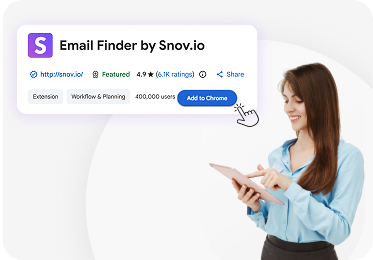
>Snov Chrome Extension
How to Evaluate B2B Data Vendors for Accuracy and Compliance
The Snov.io Chrome Extension helps sales teams discover verified contact information while browsing websites, LinkedIn profiles, and Google search results. Instead of switching between multiple prospecting tools, users can capture email addresses and company data directly from their browser.
This significantly reduces research time and accelerates B2B lead generation. Sales professionals can quickly identify decision-makers, collect contact information, and organize leads for outreach without leaving the page they are viewing.
In this guide, you will learn how the Snov Chrome extension works, explore its key features, and understand its usability for prospecting teams. The article also highlights how it compares with tools like the ReachStream Chrome extension for scaling outbound workflows.
The Snov.io Chrome Extension is a browser-based prospecting tool that helps users find professional email addresses and business contacts while browsing the internet. It works directly within Chrome, allowing users to capture lead data without opening additional platforms.
When activated on a company website or LinkedIn page, the extension scans the domain and identifies available contact information associated with that organization. This includes email addresses, job roles, and company details that help sales teams understand their prospects.
The tool is designed for professionals who need to collect contacts quickly while conducting research online. Instead of manually compiling spreadsheets, users can build prospect lists automatically as they browse.
The Snov.io Chrome Extension provides several prospecting capabilities that simplify contact discovery and lead collection. These features support both individual sales representatives and teams managing large prospecting campaigns. Some of the most commonly used features include:
Once leads are captured, they can be saved directly in the Snov.io account. This makes it easier for teams to organize contacts, manage prospect lists, and keep everything ready for upcoming outreach campaigns.
The extension also supports exporting contacts to spreadsheet formats or CRM tools. This allows sales teams to move leads into their existing workflows smoothly, making it easier to track prospects and continue the sales process.
While both tools support prospecting workflows, they focus on slightly different use cases. The Snov.io Chrome Extension is built primarily for real-time email discovery during browsing and research activities.
Sales professionals often use it when reviewing company websites or exploring LinkedIn profiles. The tool quickly identifies potential email contacts associated with the company domain.
The ReachStream Chrome Extension, on the other hand, is designed for large-scale B2B lead generation. Instead of finding contacts one at a time, it provides access to extensive business contact datasets that help teams build larger and more targeted prospect lists.
The main differences include:
Snov.io strengths:
ReachStream Chrome Extension strengths:
Many prospecting teams use both tools together. This combination allows them to discover contacts quickly during research while also accessing larger datasets for scalable outbound campaigns.
The Snov.io Email Finder Chrome Extension includes several features designed specifically for outbound prospecting. These tools help teams locate verified contacts faster and organize leads for outreach campaigns.
Instead of relying on manual research, sales teams can collect contact information automatically as they browse.
The core function of the Snov.io Chrome Extension is identifying business email addresses connected to a company domain. When users visit a website, the extension scans the page and reveals available email contacts.
After discovering email addresses, the extension can verify them to determine whether they are valid and deliverable. This helps teams avoid sending messages to incorrect or inactive addresses.
The verification process typically classifies emails into several categories:
Using verified contacts helps reduce bounce rates and improves the effectiveness of outreach campaigns.
LinkedIn remains one of the most valuable sources for B2B lead generation. The Snov.io Email Finder Chrome Extension allows users to collect contact information directly from LinkedIn profiles and search results.
Sales teams often browse LinkedIn to identify decision-makers inside target companies. With the extension activated, they can quickly capture available email addresses related to
those profiles.
Common LinkedIn prospecting actions include:
This feature reduces the need for manual research and helps teams build prospect lists faster.
Another useful capability is domain-based lead discovery. This feature allows users to identify multiple contacts connected to a single company domain.
When visiting a company website, the extension scans the domain and reveals several potential contacts associated with the organization.
These contacts often include professionals from different departments, such as:
Users can select the most relevant contacts and save them into prospect lists for future campaigns. This approach works particularly well for account-based sales strategies.
The Snov.io Chrome Extension is designed to be simple and easy to use. Even users without technical expertise can begin collecting leads within minutes of installation.
The typical workflow involves three main steps: installation, lead discovery, and lead export.
The installation process begins with downloading the extension from the Chrome Web Store. Users simply search for the Snov Chrome Extension and click the installation button.
Once installed, the extension icon appears in the browser toolbar. Users must then log into their Snov.io account to activate the tool.
After signing in, the extension becomes ready for use across various websites, including company pages and LinkedIn profiles.
Once the extension is active, users can begin collecting contacts while browsing the web. For example, when visiting a company website, the extension can scan the domain and display available email contacts.
The process usually involves:
Users can then select specific contacts and add them to prospect lists.
This real-time discovery process allows sales professionals to build lead lists while performing normal research activities.
After collecting leads, many teams export the data into a CRM tool or sales automation platform. The extension allows contacts to be downloaded in spreadsheet formats or sent to other systems.
Export options commonly include:
Some teams also combine Snov.io data with tools like ReachStream to enrich company information and expand prospect lists.
This integration ensures captured leads become part of a structured sales workflow rather than isolated data points.
The Snov.io Chrome Extension is widely used because it simplifies everyday prospecting tasks. Instead of manually searching for contact details, users can collect lead information automatically during browsing.
This streamlined workflow improves both efficiency and data organization for sales teams.
Prospecting often requires navigating between multiple websites and tools. Sales professionals may search LinkedIn, review company websites, and record contact details in spreadsheets.
The Snov Chrome Extension reduces these manual steps by gathering contact information directly from the page being viewed.
This automation allows teams to:
As a result, sales representatives can dedicate more time to building relationships with potential customers.
Accurate contact data is essential for successful email outreach campaigns. Invalid addresses can lead to bounced emails and reduced sender reputation.
The extension verifies emails during the discovery process, helping users identify which addresses are safe to use.
Verified contacts help teams achieve several benefits:
Reliable data ensures that outreach efforts reach the right audience.
Prospecting rarely happens in isolation. Sales development representatives, marketers, and account executives often collaborate when building lead lists and running campaigns.
The Snov.io web extension allows teams to store contacts inside shared prospect lists within their accounts.
This collaborative structure helps teams:
As a result, prospecting efforts remain consistent and well structured.
The Snov extension works well for individual prospect discovery during browsing. However, some organizations require additional tools to manage larger prospecting datasets.
The ReachStream Chrome Extension supports these broader workflows by providing access to extensive business contact databases.
ReachStream focuses on large-scale B2B lead generation and contact enrichment. It helps teams access detailed company data and filter contacts based on specific criteria.
Common capabilities include:
These capabilities allow sales teams to generate large prospect lists for outbound campaigns.
Both tools provide value depending on how a team approaches prospecting.
Advantages of Snov.io:
Advantages of ReachStream:
Many teams combine both tools to balance quick email discovery with larger database access.
Using the Snov.io Chrome Extension effectively requires structured prospecting habits. Following a few best practices can significantly improve outreach performance.
Lead lists can grow quickly during prospecting sessions. Without organization, teams may struggle to manage large numbers of contacts.
To maintain clarity, teams should:
Organized lead lists make outreach campaigns easier to manage.
Duplicate contacts often appear when leads are collected from multiple sources. These duplicates can cause confusion during campaign execution.
Teams should regularly clean their prospect databases and remove duplicate entries. Recommended practices include:
Clean data improves outreach efficiency and campaign accuracy.
Capturing a lead is only the first step in the prospecting process. Effective outreach requires consistent follow-ups with potential contacts.
Sales teams should plan structured communication sequences to maintain engagement.
Best practices include:
Consistent follow-ups help convert prospects into active opportunities.
The Snov.io Chrome Extension makes finding business emails much easier while browsing company websites or LinkedIn profiles. With built-in email discovery and verification, sales teams can quickly collect accurate contacts and spend less time on manual research.
When paired with a platform like ReachStream, prospecting becomes much more scalable. Teams can move beyond single contact lookups, access larger B2B datasets, enrich CRM records, and build stronger prospect lists for consistent outreach.
Yes. Our Chrome Extension can complement the Snov.io Chrome Extension workflow. Teams often collect emails using Snov’s email finder extension, then use our platform to enrich contacts, expand datasets, and prepare lists for B2B lead generation campaigns.
Our Chrome Extension helps teams go beyond basic email extractor tools. While the Snov.io web extension focuses on email discovery, our platform provides large B2B datasets, advanced filters, and exports that support scalable CRM solution workflows.
Yes. If you capture contacts using Snov’s email finder Chrome Extension, we help enrich those records with additional company data, verified email addresses, and segmentation filters so teams can build stronger B2B lead generation lists.
Yes. Unlike tools that focus mainly on single-contact discovery, our Chrome Extension is built for scalable prospecting. We help teams generate large contact lists, filter by role or industry, and export data directly to a CRM tool.
Many teams do. The Snov.io Chrome Extension works well for quick email discovery on LinkedIn or Google search, while ReachStream Chrome Extension helps expand those leads into larger datasets for organized outreach and CRM-ready prospect lists.

Author

Access 200M+ verified business emails and grow your sales pipeline effortlessly.
Don't forget to share this post!















Check out our other blogs!
Hunter.io API: Email Finding and Verification Explained


Is Hunter.io Legit? Honest Review Before You Subscribe