Wiza Pricing 2026: Plans from $0 to $399/mo + Hidden Costs

Best Tips on Lead Generation for Technology Companies
Summarize this article with AI:


Wiza pricing starts at $0 for a limited Free plan and runs from about $49 to $399+ per month for paid plans. Credits do not roll over, annual plans swap credit counts for export caps, and Wiza works best alongside a LinkedIn Sales Navigator subscription, which is billed separately.
Your real monthly cost is the Wiza plan plus Sales Navigator plus any overages. Looking for a general overview of the tool instead? Our Wiza review covers features, accuracy and who it suits. This page focuses only on what Wiza costs and how its credits work.
What is Wiza
| Price from | $0 (Free), $49 per month (first paid plan) |
| Best for | Individuals and small teams that already live inside LinkedIn Sales Navigator |
| Not for | Teams that want a standalone contact database or predictable, rolling credits |
| Free plan | 20 emails and 5 phone numbers per month |
| Biggest watch-out | Credits expire each billing period, and Sales Navigator is an extra cost |
How Much Does Wiza Cost in 2026?
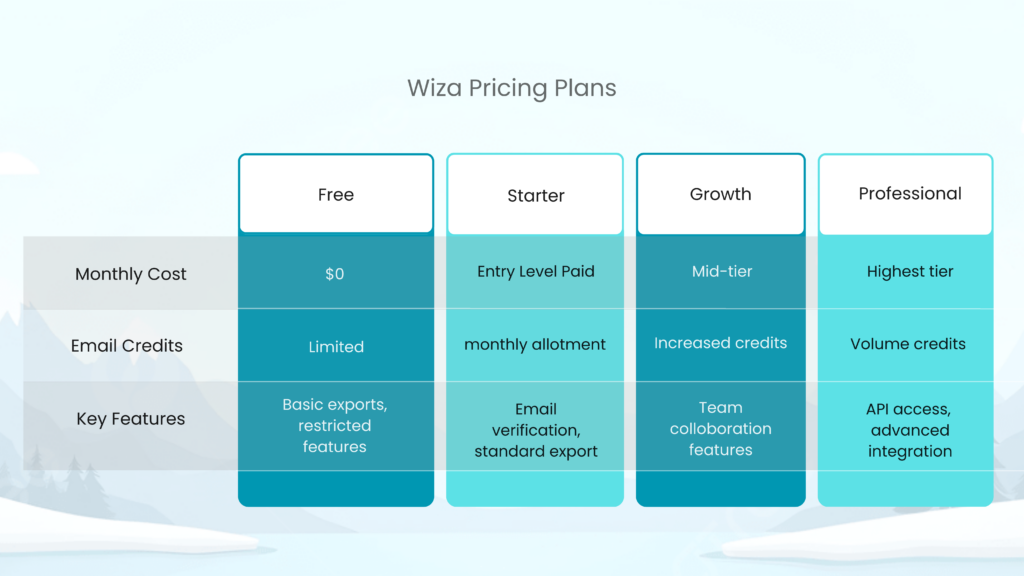
Wiza structures its pricing across five tiers, each built for different prospecting volumes and team sizes. The credit mechanics change depending on whether you choose monthly or annual billing, so understanding the differences matters before you commit.
Free Plan
The Free plan gives you 20 email credits, and 5 phone credits a month. That is enough to test whether Wiza’s LinkedIn extraction fits your workflow, but not enough for steady prospecting. Think of it as a sandbox.
Starter Plan
At $49 a month you get 100 emails and 100 phone credits. It suits freelancers and small business owners with light volumes. Reported overage rates are about $0.15 per extra email and $0.35 per extra phone number, so heavy months add up quickly.
Email Plan
The $99 monthly plan focuses on email extraction. On monthly billing it is capped at 500 emails, and phone numbers cost about $0.35 each, which makes it a weak fit for teams that rely on direct dials.
Email and Phone Plan
At $199 a month, this tier adds phone access. It makes sense for multi-channel outreach, but compare it against your expected contact volume first, since both credit types are used separately.
Team Plan
Team pricing starts around $399 a month for three users, with multi-seat access and shared allowances. Seat pricing is negotiable at larger sizes. Clarify caps, renewal terms and cancellation notice before committing.
How Do Wiza Credits Work?
Credits are Wiza’s currency, and they limit how many contacts you can export.
Email credits. One email credit equals one contact export with a verified email address. Wiza generally deducts credits only for valid emails, but timing of verification can still let the occasional bad address through.
Phone credits. Phone credits are separate from email credits. Each phone number found uses one, whether or not you also export the email.
Export credits on annual plans. Annual plans swap separate allowances for export credits. One export covers one contact, whether you get an email, a phone number, or both. The emails and phones are “unlimited,” but the number of contacts you can pull is not.
Rollover. Credits do not roll over. Monthly credits expire each month, and annual credits expire each year. You cannot bank credits in slow months for a busy quarter.
Monthly vs Annual Billing
Monthly billing suits teams with changing volume or those testing the tool. Annual billing lowers the per-month price and unlocks the “unlimited” allowances, but it commits you a year.
Reviewers report that annual plans auto-renew unless you cancel about 30 days before the renewal date, and some say they felt pushed toward annual billing. Test on a monthly plan first, track real usage and move annually only when your volume is predictable.
Test ReachStream's ESP-verified emails with no risk.
What Is the Real Monthly Cost with Sales Navigator?
Wiza’s own plan price is only part of the bill. Wiza works best with LinkedIn Sales Navigator, which is billed separately and is commonly quoted at roughly $79 to $149 a month per seat depending on tier and billing. Adding that range to the monthly plan prices above gives a rough all-in estimate, before tax and overages.
| Wiza plan (monthly billing) | Plan price | With Sales Navigator ($79 to $149) |
|---|---|---|
| Starter | $49 | $128 to $198 |
| Email (Growth) | $99 | $178 to $248 |
| Email+Phone (Pro) | $199 | $278 to $348 |
| Team (3 users, from) | $399 | Plus one Sales Navigator seat per user |
These totals are simple additions of published ranges, so confirm current Sales Navigator pricing with LinkedIn.
What Does Each Wiza Contact Really Cost?
Cost per contact depends on how much of your allowance you use. A simple way to check is to divide the plan price by the credits you use.
- Starter: $49 for 100 email credits is about $0.49 per email if you use every credit.
- Email plan on monthly billing: $99 for up to 500 emails is about $0.20 per email at full use, with phone numbers at about $0.35 each on top.
- Light months: if you only use half your credits, your real cost per contact doubles, because unused credits expire.
For comparison, ReachStream Prospect’s yearly billed Starter plan is $29 a month for 5,000 export credits, which works out to about $0.006 per credit if you use them all.
That is a division of listed prices, and the products differ: Wiza pulls contacts from LinkedIn searches, while ReachStream is a searchable B2B database. Check each vendor’s current pricing page.
Which Hidden Costs Should You Watch For?
- LinkedIn Sales Navigator: an extra monthly subscription per user.
- Overage fees: per credit charge when you exceed your allowance.
- Expiring credits: unused credits disappear at the end of each period.
- Auto-renewal: annual plans can be renewed unless you cancel in time.
- Integration limits: some CRM connections may be limited on lower tiers.
- Wasted credits: occasional invalid exports can still use credits.
What Features Do You Get?
Wiza provides verified email addresses, phone numbers on higher tiers, job titles, company details, location and LinkedIn profile URLs. Its Chrome extension is the main interface, supporting single-profile exports and bulk exports from Sales Navigator.
CRM options include Salesforce, HubSpot and Outreach, though lower tiers may restrict them. Check the current feature list for your plan before you buy.
How Does Wiza Compare to Alternatives?
When you compare Wiza with other tools, look at true cost per contact, how flexible the credit rules are and how data accuracy is tested. Our guide to Wiza competitors compares more options.
| Tool | Starting price | Free plan | Data source |
|---|---|---|---|
| Wiza | $49 a month (paid) | 20 emails and 5 phones a month | LinkedIn and Sales Navigator searches |
| ReachStream Prospect | $29 a month billed yearly ($39 monthly) | 100 export credits a month, no credit card | Searchable B2B database with 500M+ contacts |
ReachStream Prospect is designed to help teams search, filter and export without depending on a Sales Navigator subscription. You can filter by industry, job title, seniority, location, company size and technologies used.
It includes a built-in email verifier, a Chrome extension for LinkedIn, CSV export, and native Salesforce and HubSpot sync. Coverage differs by region and role, so test with the Free plan first. You can read more on the ReachStream Prospect page or see our Apollo comparison.
Build a precise B2B target list
How Do You Choose the Right Wiza Plan?
- Choose Free if: you only want to test the tool at minimal volume.
- Choose Starter if: you are a solo user who needs a small number of contacts each month.
- Choose the Email plan if: you run steady email-only campaigns.
- Choose Email+Phone if: multi-channel outreach is essential and you want direct dials.
- Choose Team if: several people need access or you need high volume.
Start on a monthly plan, track how many credits you use for two billing cycles, and only then consider annual billing. For other ways to build lists, see our guide to sales prospecting tools.
Is Wiza Worth the Price?
Wiza can be a strong LinkedIn prospecting tool, but its real cost goes beyond the advertised price. Non-rolling credits, separate charges for phone numbers, export caps on annual plans, and the Sales Navigator subscription all affect your total spend.
It is worth it when your team already works inside the Sales Navigator and your monthly volume is steady. It is harder to justify if your volume swings, or if you want a database you can search without LinkedIn. Estimate your real monthly volume, test with a monthly plan and compare alternatives.
Final Thoughts
Wiza can be a powerful LinkedIn prospecting tool, but its real cost goes beyond the advertised monthly price. Non-rolling credits, separate charges for phone numbers, export caps on annual plans, and the required LinkedIn Sales Navigator subscription all affect your total spend.
Choosing the right plan means realistically estimating your monthly volume and deciding whether email-only or multi-channel outreach fits your strategy. Test with a monthly plan first, track your actual credit usage, and compare alternatives to ensure you’re getting the best value for your prospecting budget.
FAQs
How much does Wiza cost per month?
Wiza has a Free plan at $0. Paid plans start at about $49 a month and go up to about $199 a month for the plans most individuals use, with team pricing from about $399 a month for three users. Annual billing lowers the per-month price.
Is there a free trial for Wiza?
Wiza offers a Free plan with limited credits rather than a time-bound trial. It includes 20 email and 5 phone credits a month, which is enough to test the tool but not to run campaigns.
Do Wiza credits roll over?
No. Unused credits expire at the end of each billing period, monthly or annual depending on your plan. You cannot save credits for a busier month.
Do I need a LinkedIn Sales Navigator to use Wiza?
Wiza works best with Sales Navigator, and bulk exports from Sales Navigator searches depend on an active subscription. It is billed separately by LinkedIn, so add it to your budget.
Does Wiza offer refunds for unused credits?
Wiza’s policy should be confirmed with Wiza directly. Credits do not roll over, and annual plans can auto-renew unless you cancel before the renewal date, so read the terms before you commit.
What does Wiza cost per contact?
It depends on the use. At full use, the Starter plan works out to about $0.49 per email and the monthly Email plan to about $0.20 per email, with phone numbers extra. Unused credits raise your effective cost per contact.
Can I switch Wiza plans mid-billing cycle?
Upgrades usually take effect straight away, while downgrades often apply at the next renewal. Check the current terms before you assume mid-cycle flexibility.
Table of Contents
Access 500M+ verified business emails and grow your sales pipeline effortlessly.
Claim Your 100 Free Export Credits Today!
Power Your Sales with Targeted Data

Don't forget to share this post!















Check out our other blogs!

ReachStream’s Direct Dial Database: What Makes It Different
November 4, 2026
The B2B Outbound Playbook: From ICP to First Meeting
November 4, 2026

What Is Prospecting? A Beginner’s Guide for Sales Teams
November 3, 2026